Discussion:
How to set up your mobile devices & home router for privacy/security.
Discussion:
How to set up your mobile devices & home router for privacy/security.
For those wishing to know more about this topic, most people have their router Wi-Fi AP set to broadcast the SSID, which means it's uploaded to world-wide publicly accessible databases whether they like it or not.
a. The (unique) GPS location (of the phone uploading it) is uploaded
b. The signal strength (of the signal to the phone) is uploaded
c. The (unique) BSSID (MAC address) is uploaded - which is essentially you
d. The (normally non-unique) SSID is uploaded (with or without _nomap)
Of course, you should always disable Wi-Fi Protected Setup (WPS). Duh.
And, keep your firmware updated (duh),
Disable remote administration to your router (duh) & use HTTPS for login.
You "can" restrict connections by MAC, but if you're randomizing the MAC address, it's going to be impossible (as is static IP addresses set at the router level - they now have to be set at the mobile device level instead).
Also enable and check the router log (duh) for intrusions, but if you've
ever done that, you'll know already you're being attacked constantly.
Disable UPnP (duh), and firewall inbound traffic (duh) and enable DNS encryption (DoH/DoT), which seems easy, but I've found it to be a PITA.
A. DoH (DNS over HTTPS) wraps DNS queries inside HTTPS traffic
B. DoT (DNS over TLS) sends DNS queries over a TLS-encrypted channel
You enable iOS 14 & up DoH using Settings > Wi-Fi > DNS & you enable
Android 9+ DoT with Settings > Network & Internet > Advanced > Private DNS.
You enable DoH on Windows in Settings > Network & Internet > Change adapter options > DNS settings where Windows 11 is still DoH but the GUI is better.
On Android devices, you can add a system-wide firewall such as NetGuard.
It can block Wi-Fi/CellularData access per app. Not available on iOS.
I don't have much experience with RethinkDNS, but it's a FOSS Android app that combines encrypted DNS (DoH/DoT/DNSCrypt) with a system-wide firewall.
i. RethinkDNS = firewall + encrypted DNS (DoH/DoT/DNSCrypt) + blocklists
ii. NetGuard = firewall + per-app blocking + ad/tracker blocklists
You'll never have any privacy/security on iOS, which sucks at both (and anyone thinking it doesn't suck, clearly doesn't know anything about iOS).
While we're at it, it's probably a good idea to put smart TVs, cameras, and IoT gadgets on a separate VLAN or guest SSID, and it goes without saying further that you should change the rude/ignorant default iOS/Android setup.
If your neighbor's Wi-Fi is open, Windows can BLOCK accidental connections:--
@echo off
netsh wlan show filters
echo Blocking unwanted Wi-Fi networks...
REM Replace these with the SSIDs you want to hide
netsh wlan add filter permission=block ssid="SSID1" networktype=infrastructure
netsh wlan add filter permission=block ssid="SSID2" networktype=infrastructure
netsh wlan add filter permission=block ssid="SSID3" networktype=infrastructure
echo Done! The specified SSIDs are now blocked.
netsh wlan show filters
pause
What did I miss?
Discussion:
How to set up your mobile devices & home router for privacy/security.
For those wishing to know more about this topic, most people have their router Wi-Fi AP set to broadcast the SSID, which means it's uploaded to world-wide publicly accessible databases whether they like it or not.
a. The (unique) GPS location (of the phone uploading it) is uploaded
b. The signal strength (of the signal to the phone) is uploaded
c. The (unique) BSSID (MAC address) is uploaded - which is essentially you
d. The (normally non-unique) SSID is uploaded (with or without _nomap)
Every mobile device owned by ignorant/rude people is uploading that privacy to the world-wide publicly accessible databases (which have been abused).
Disable remote administration to your router (duh) & use HTTPS for login.
That removes the warranty. Seriously. My router is remotely managed by
my ISP. Not via plain ssh login, they have their own dedicated channel.
For those wishing to know more about this topic, most people have their
router Wi-Fi AP set to broadcast the SSID, which means it's uploaded to
world-wide publicly accessible databases whether they like it or not.
a. The (unique) GPS location (of the phone uploading it) is uploaded
b. The signal strength (of the signal to the phone) is uploaded
c. The (unique) BSSID (MAC address) is uploaded - which is essentially you
A router is not a person. At worst it represents a household in the same
way a postal address does.
d. The (normally non-unique) SSID is uploaded (with or without _nomap)
Every mobile device owned by ignorant/rude people is uploading that privacy >> to the world-wide publicly accessible databases (which have been abused).
No they haven't. A theoretical observation has been made. There's no
evidence of "abuse".
While you're at it, the equally rude satellites, google cars, the post
office and census collectors are also sharing extremely private information regarding everyone's houses, where they are and what they look like.
I STRONGLY recommend first wrapping your house in tinfoil (hopefully that will smother your *outgoing* connections), then radar opaque paint and, finally, camouflage netting.
For extra privacy go live in the woods.
Correction: "privacy/security" translates to "self-aggrandising ultra-paranoids".
Many states have their own computer crime statutes that prohibit
unauthorized access to networks. For example, Florida and Michigan have
prosecuted individuals for unauthorized Wi-Fi use under state computer
crime laws.
But how do you know it is not authorized?
By default, a phone will connect to an open WiFi without asking. At
least, it was so several years ago, I don't know currently because the configuration is cloned from one phone to the next.
And Windows I think does the same, which is, I understand, what happened
to the OP.
I take that "looking" inside the network is not legal. But using a WiFi
that is open? I know some people that intentionally left their WiFi open
to any one that wanted. That was the view.
But then, USA people are quite paranoid about private property, and can shoot an intruder without asking.
Here, some people were taken to court for "illegally downloading
movies". In their defence, they said that it was not them, but somebody
else using their WiFi, and the reverse could not be proven. They kept
their WiFi open. They won. :-D
I'm actually surprised, Carlos, that the ISP manages "the router", where I >would NOT be surprised if the ISP manages "the modem" (even as I'm well
aware that router:modem combinations exist (which may be what you have).
On 12/2/25 9:26 AM, Marian wrote:
I'm actually surprised, Carlos, that the ISP manages "the router", where I >would NOT be surprised if the ISP manages "the modem" (even as I'm well >aware that router:modem combinations exist (which may be what you have).
My router/modem is owned and operated by my ISP. It's part of the service.
Further unless turned off it's also a hotspot for all the other ISP's
customers (their password required) who are in WiFi range and might want to
use it. When mine failed awhile back I used my neighbors hotspot until it
was fixed (at no charge, part of the service). Great for us none-tech
customers whom I suspect most are...
Chris wrote:
A router is not a person. At worst it represents a household in the same
For those wishing to know more about this topic, most people have their >>> router Wi-Fi AP set to broadcast the SSID, which means it's uploaded to >>> world-wide publicly accessible databases whether they like it or not.
a. The (unique) GPS location (of the phone uploading it) is uploaded
b. The signal strength (of the signal to the phone) is uploaded
c. The (unique) BSSID (MAC address) is uploaded - which is essentially you >>
way a postal address does.
Hi Chris,
If you move from one home to another, and if you take your router with you, then the "bad guy" can trace your movements exactly as to time & location.
They know your exact location & exactly when you changed locations.
d. The (normally non-unique) SSID is uploaded (with or without _nomap)No they haven't. A theoretical observation has been made. There's no
Every mobile device owned by ignorant/rude people is uploading that privacy
to the world-wide publicly accessible databases (which have been abused). >>
evidence of "abuse".
I know what you're talking about,
but most people reading this won't know
that the Apple system (versus the Google system) is atrociously designed.
The way Apple does it is Apple allows hundreds upon hundreds of access
point location information to be downloaded in a single instance by anyone
on the planet, while Google's system is far more constrained in terms of abuse potential.
You & I can delve deeper (much deeper) than that astute summary, but that quick overview of the huge differences between the highly insecure Apple system and the lousy Google system (more secure, but it still sucks in
terms of privacy) should suffice for most people here unless they ask for further details.
While you're at it, the equally rude satellites, google cars, the post
office and census collectors are also sharing extremely private information >> regarding everyone's houses, where they are and what they look like.
What you're saying I've heard a lot from people
Privacy is like personal hygiene. You never stop washing your hands.
I STRONGLY recommend first wrapping your house in tinfoil (hopefully that
will smother your *outgoing* connections), then radar opaque paint and,
finally, camouflage netting.
For extra privacy go live in the woods.
These are the exact words of sklavin, Chris.
Many people in history have decided to be a slave; but I'm not one of them. And more to the point, I do not advocate that people become slaves.
You advocate slavery. I advocate freedom.
AJL <noemail@none.com> wrote:
On 12/2/25 9:26 AM, Marian wrote:
I'm actually surprised, Carlos, that the ISP manages "the router", where I >> >would NOT be surprised if the ISP manages "the modem" (even as I'm well
aware that router:modem combinations exist (which may be what you have).
My router/modem is owned and operated by my ISP. It's part of the service. >> Further unless turned off it's also a hotspot for all the other ISP's
customers (their password required) who are in WiFi range and might want to >> use it. When mine failed awhile back I used my neighbors hotspot until it >> was fixed (at no charge, part of the service). Great for us none-tech
customers whom I suspect most are...
The modem/router may be *owned* by your ISP and the *modem* part is
indeed likely to be operated and managed by your ISP. But the *router*
part can not be 'operated' (managed?) by your ISP, at least not fully, >otherwise they could mess up your part (your 'LAN'), change your
password, access your LAN, etc.. *If* they could 'operate'/manage the
router part, you could never be hold liable for what happens on your >end/network, because it wouldn't be your network.
FWIW, my (cable) ISP indeed manages the modem part, I manage the rest
(for example the WiFi password, set fixed IP addresses, etc.).
Carlos E.R. wrote:I don't know about the USA, but in the UK, a lot of users have _one_
Disable remote administration to your router (duh) & use HTTPS for login. >>That removes the warranty. Seriously. My router is remotely managed by
my ISP. Not via plain ssh login, they have their own dedicated channel.
Hi Carlos,
Thanks for adding the missing information that the router may be managed by the ISP, which, of course, somewhat changes what you can and cannot do to effect better privacy/security.
I'm actually surprised, Carlos, that the ISP manages "the router", where I would NOT be surprised if the ISP manages "the modem" (even as I'm well> aware that router:modem combinations exist (which may be what you have).
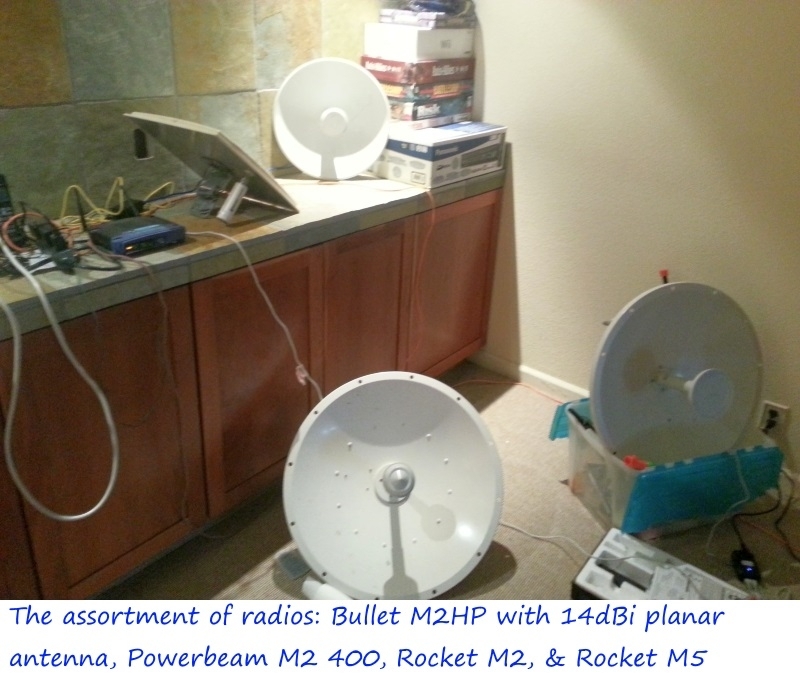
In my case, I don't have a modem since I get my Internet from a dozen miles away over the air via WISP, but my "rooftop transceiver" is managed by the WISP (although he gives me his password so that I can make changes).
Most people in the USA don't have a transceiver like I do; they have a
modem, and some people have a modem which is combined into a router.
I am unfamiliar with that setup personally, since I've never owned a modem, but I've bought them for my kids when they moved into apartments, so I'm familiar with the concept that you seem to be speaking about.
Thanks for adding the extra value so that everyone on the team benefits.
AJL <noemail@none.com> wrote:
[quoted text muted]
customers (their password required) who are in WiFi range and might want to
use it. When mine failed awhile back I used my neighbors hotspot until it
was fixed (at no charge, part of the service). Great for us none-tech
customers whom I suspect most are...
The modem/router may be *owned* by your ISP and the *modem* part is
indeed likely to be operated and managed by your ISP. But the *router*
part can not be 'operated' (managed?) by your ISP, at least not fully, otherwise they could mess up your part (your 'LAN'), change your
password, access your LAN, etc.. *If* they could 'operate'/manage the
router part, you could never be hold liable for what happens on your end/network, because it wouldn't be your network.
My ISP has the ability to reach into "my" router -- i.e. that portion
of the combined modem/router that they supply as part of their
service -- and make changes;
Carlos E.R. wrote:
Disable remote administration to your router (duh) & use HTTPS for login. >>That removes the warranty. Seriously. My router is remotely managed by
my ISP. Not via plain ssh login, they have their own dedicated channel.
Hi Carlos,
Thanks for adding the missing information that the router may be managed by the ISP, which, of course, somewhat changes what you can and cannot do to effect better privacy/security.
I'm actually surprised, Carlos, that the ISP manages "the router", where I would NOT be surprised if the ISP manages "the modem" (even as I'm well
aware that router:modem combinations exist (which may be what you have).
In my case, I don't have a modem since I get my Internet from a dozen miles away over the air via WISP, but my "rooftop transceiver" is managed by the WISP (although he gives me his password so that I can make changes).--
Most people in the USA don't have a transceiver like I do; they have a
modem, and some people have a modem which is combined into a router.
I am unfamiliar with that setup personally, since I've never owned a modem, but I've bought them for my kids when they moved into apartments, so I'm familiar with the concept that you seem to be speaking about.
Thanks for adding the extra value so that everyone on the team benefits.
On 2025/12/2 16:26:18, Marian wrote:
Carlos E.R. wrote:
Disable remote administration to your router (duh) & use HTTPS for login. >>>That removes the warranty. Seriously. My router is remotely managed by
my ISP. Not via plain ssh login, they have their own dedicated channel.
Hi Carlos,
Thanks for adding the missing information that the router may be managed by >> the ISP, which, of course, somewhat changes what you can and cannot do to
effect better privacy/security.
I'm actually surprised, Carlos, that the ISP manages "the router", where I >> would NOT be surprised if the ISP manages "the modem" (even as I'm well
aware that router:modem combinations exist (which may be what you have).
In my case, I don't have a modem since I get my Internet from a dozen miles >> away over the air via WISP, but my "rooftop transceiver" is managed by the >> WISP (although he gives me his password so that I can make changes).
Most people in the USA don't have a transceiver like I do; they have a
modem, and some people have a modem which is combined into a router.
I am unfamiliar with that setup personally, since I've never owned a modem, >> but I've bought them for my kids when they moved into apartments, so I'm
familiar with the concept that you seem to be speaking about.
Thanks for adding the extra value so that everyone on the team benefits.
I don't know about the USA, but in the UK, a lot of users have _one_
whitish box, which connects to the 'phone line, and contains the MoDem, router, hub, wifi, ... you name it, it's in that box. Common parlance - including from the ISPs who usually supply the box - is to (mis)name
that box the "router".
They usually (since the ISP supplies them) have a version of the manufacturer's software, tweaked to suit the ISP. I'm not _aware_ of any
that are remote-flashed by the ISPs, but it wouldn't surprise me.
I don't _think_ most ISP contracts say you _have_ to use their "router", though there may be some that do; however, the majority of users _do_,
since it's generally supplied "free" by the ISP, and also if anything
goes wrong - or is _suspected_ of going wrong - the ISP's support desk
(which aren't great at the best of times) are likely to tell you you're
on your own if you're not using their "router".
Chris wrote:
For those wishing to know more about this topic, most people have their
router Wi-Fi AP set to broadcast the SSID, which means it's uploaded to
world-wide publicly accessible databases whether they like it or not.
a. The (unique) GPS location (of the phone uploading it) is uploaded
b. The signal strength (of the signal to the phone) is uploaded
c. The (unique) BSSID (MAC address) is uploaded - which is essentially you
A router is not a person. At worst it represents a household in the same
way a postal address does.
Hi Chris,
If you move from one home to another, and if you take your router with you, then the "bad guy" can trace your movements exactly as to time & location.
They know your exact location & exactly when you changed locations.
d. The (normally non-unique) SSID is uploaded (with or without _nomap) >>>No they haven't. A theoretical observation has been made. There's no
Every mobile device owned by ignorant/rude people is uploading that privacy >>> to the world-wide publicly accessible databases (which have been abused). >>
evidence of "abuse".
I know what you're talking about, but most people reading this won't know that the Apple system (versus the Google system) is atrociously designed.
The way Apple does it is Apple allows hundreds upon hundreds of access
point location information to be downloaded in a single instance by anyone
on the planet, while Google's system is far more constrained in terms of abuse potential.
They usually (since the ISP supplies them) have a version of the manufacturer's software, tweaked to suit the ISP. I'm not _aware_ of any
that are remote-flashed by the ISPs, but it wouldn't surprise me.
The modem/router may be *owned* by your ISP and the *modem* part is >>indeed likely to be operated and managed by your ISP. But the *router*
part can not be 'operated' (managed?) by your ISP, at least not fully, >>otherwise they could mess up your part (your 'LAN'), change your
password, access your LAN, etc.. *If* they could 'operate'/manage the >>router part, you could never be hold liable for what happens on your >>end/network, because it wouldn't be your network.
All Greek to me. Bottom line for me is I plug in the device's AC cord, screw
on the cable, enter a password, and bingo I have WiFi and I'm online...
Thanks for adding the missing information that the router may be managed by >> the ISP, which, of course, somewhat changes what you can and cannot do to
effect better privacy/security.
I'm actually surprised, Carlos, that the ISP manages "the router", where I >> would NOT be surprised if the ISP manages "the modem" (even as I'm well
aware that router:modem combinations exist (which may be what you have).
It has a direct fibre port, integrating what previously was a separate gadget called ONT (Optical network terminal). That may qualify as a modem.
They do some maintenance. We can call the technical service when we have
a problem, and they can login remotely to assist in our problem. Saves
them a trip. I understand they have some kind of management platform,
where they enter client data and get connected to our router. That
platform is the same for the dozens of router models they install.
I assume they apply updates, but I have no proof of this.
I can change the login password and do my own management (I do), but
they keep another port for that remote management they do. That's the
one that would break the support contract.
The way Apple does it is Apple allows hundreds upon hundreds of access
point location information to be downloaded in a single instance by anyone >> on the planet, while Google's system is far more constrained in terms of
abuse potential.
You & I can delve deeper (much deeper) than that astute summary, but that
quick overview of the huge differences between the highly insecure Apple
system and the lousy Google system (more secure, but it still sucks in
terms of privacy) should suffice for most people here unless they ask for
further details.
They are no different. They will give anyone with access to the API
location information based on their wifi AP databases.
Note that the mere use of a HIDDEN BROADCAST prevents upload by Mozilla!
Note that the mere use of a HIDDEN BROADCAST prevents upload by Mozilla!
Note also that a HIDDEN BROADCAST (now) prevents upload
Does anyone know if Google/Apple WPS databases have BSSID entries sans an associated SSID?
Carlos E.R. wrote:
My main argument, which all my kids learned in spades, was that paying $150 up front once, immediately reduced the long-term costs by thousands of dollars since it instantly saved the $50 (probably now $75 or more) "installation fee" that cable companies charged, and, of course, it eliminates the $10/month (now likely $20/month) plus taxes to rent it.
<https://www.costco.com/routers-networking.html>
On 2025-12-03 00:39, Marian wrote:
Carlos E.R. wrote:
...
My main argument, which all my kids learned in spades, was that paying $150 >> up front once, immediately reduced the long-term costs by thousands of
dollars since it instantly saved the $50 (probably now $75 or more)
"installation fee" that cable companies charged, and, of course, it
eliminates the $10/month (now likely $20/month) plus taxes to rent it.
<https://www.costco.com/routers-networking.html>
It is not a rental here. We can buy a router, the monthly fee doesn't
change a cent. The advantage is (probably) a more feature rich router
and more control. The disadvantage is that you have to work out the configuration, which is a pain (AFAIK they don't publish it), and that
if something breaks you have no support. They'll help, sure, depending
on who you manage to talk with, but no support.
When I was on ADSL I had their router, but I bought my own. The configuration was simpler back then, but the router had a wizard: I just told it what Telco it was, and it configured itself. I have not seen
this feature announced with fibre.
...
Stan Brown wrote:
My ISP has the ability to reach into "my" router -- i.e. that portion
of the combined modem/router that they supply as part of their
service -- and make changes;
In the UK (and I assume wider within Europe) many ISPs do remote provisioning using TR-069 protocol.
On 2025-12-03 00:39, Marian wrote:
Carlos E.R. wrote:
...
My main argument, which all my kids learned in spades, was that paying $150 >> up front once, immediately reduced the long-term costs by thousands of
dollars since it instantly saved the $50 (probably now $75 or more)
"installation fee" that cable companies charged, and, of course, it
eliminates the $10/month (now likely $20/month) plus taxes to rent it.
<https://www.costco.com/routers-networking.html>
It is not a rental here.
Andy Burns wrote:
In the UK (and I assume wider within Europe) many ISPs do remote
provisioning using TR-069 protocol.
Do you know the extent of that "provisioning", i.e. what they can and
can not do?
Over time (some 20+ years), my modem/router devices have either been installed by an on-site technician (probably two times) or by myself,
i.e. they ship a replacement modem/router (sometimes with things like
cables, adapters, outlets, etc.) and I install it (probably three or
more times).
It is not a rental here. We can buy a router, the monthly fee doesn't
change a cent.
The advantage is (probably) a more feature rich router
and more control. The disadvantage is that you have to work out the configuration, which is a pain (AFAIK they don't publish it), and that
if something breaks you have no support. They'll help, sure, depending
on who you manage to talk with, but no support.
When I was on ADSL I had their router, but I bought my own.
The
configuration was simpler back then, but the router had a wizard: I just told it what Telco it was, and it configured itself. I have not seen
this feature announced with fibre.
As I've said before, here in UK most users who are connected to a copper >'phone line have one box, containing MoDem, router, hub, and wifi base,
which box is generally referred to as a "router";
Frank Slootweg wrote:
Andy Burns wrote:
In the UK (and I assume wider within Europe) many ISPs do remote
provisioning using TR-069 protocol.
Do you know the extent of that "provisioning", i.e. what they can and can not do?
quite likely change all settings and do firmware updates, reboots
Over time (some 20+ years), my modem/router devices have either been installed by an on-site technician (probably two times) or by myself,
i.e. they ship a replacement modem/router (sometimes with things like cables, adapters, outlets, etc.) and I install it (probably three or
more times).
I generally start with the ISP's device, then migrate to my own device,
but the I've stayed with same ISP since 2004
Hence, whether a BSSID without an SSID ends up in a vendor database is a policy/implementation question we need to find out for Apple/Google WPS.
quite likely change all settings and do firmware updates, reboots
Also of the router part, i.e. router settings, passwords, IP settings, etc.?
If so, how is the user's ('LAN') still his/hers and still secure? How
about the user being liable for any abuse/misuse from the ISP's side/ personel?
Over time (some 20+ years), my modem/router devices have either been
installed by an on-site technician (probably two times) or by myself,
i.e. they ship a replacement modem/router (sometimes with things like
cables, adapters, outlets, etc.) and I install it (probably three or
more times).
I generally start with the ISP's device, then migrate to my own device,
but the I've stayed with same ISP since 2004
Over time, I have used two of my own routers. The first one was
needed, because the modem only had one hardwired connection. The second, because the first was too slow (bps). After that, I've used the ISP's built-in routers because they offered sufficient functionality. And yes,
also since about that time (March 2003 actually).
I can't imagine any ISP/WISP willing to do all that private LAN setup.
Carlos E.R. wrote:
It is not a rental here. We can buy a router, the monthly fee doesn't
change a cent.
Hi Carlos,
I need to be clear. I never said what you apparently thought I said.
It's not the "router", per se, that people rent out here.
It's the modem.
Where I live we have 40-acre zoning, so every property has to be a minimum[]
of 40 acres, where if you don't have a bunch of radios scattered about, you
Marian wrote:I had heard of the phrase <https://en.wiktionary.org/wiki/back_forty>
Where I live we have 40-acre zoning, so every property has to be a minimum >> of 40 acres
So hugely different outlooks! I've never heard (though I'm sure you're
right) of a _minimum_ property size before.
J. P. Gilliver wrote:
Marian wrote:I had heard of the phrase <https://en.wiktionary.org/wiki/back_forty>
Where I live we have 40-acre zoning, so every property has to be a
minimum
of 40 acres
So hugely different outlooks! I've never heard (though I'm sure you're
right) of a _minimum_ property size before.
On 2025/12/3 12:47:9, Carlos E.R. wrote:
On 2025-12-03 00:39, Marian wrote:As I've said before, here in UK most users who are connected to a copper 'phone line have one box, containing MoDem, router, hub, and wifi base,
Carlos E.R. wrote:
...
My main argument, which all my kids learned in spades, was that paying $150 >>> up front once, immediately reduced the long-term costs by thousands of
dollars since it instantly saved the $50 (probably now $75 or more)
"installation fee" that cable companies charged, and, of course, it
eliminates the $10/month (now likely $20/month) plus taxes to rent it.
<https://www.costco.com/routers-networking.html>
It is not a rental here. We can buy a router, the monthly fee doesn't
change a cent. The advantage is (probably) a more feature rich router
and more control. The disadvantage is that you have to work out the
configuration, which is a pain (AFAIK they don't publish it), and that
if something breaks you have no support. They'll help, sure, depending
on who you manage to talk with, but no support.
When I was on ADSL I had their router, but I bought my own. The
configuration was simpler back then, but the router had a wizard: I just
told it what Telco it was, and it configured itself. I have not seen
this feature announced with fibre.
...
which box is generally referred to as a "router"; AIUI those with an
actual fibre connection to the home still have a similar-_looking_ box,
still referred to as a "router", but one additional box that connects to
the fibre, and to which the "router" connects, usually by an ethernet cable.
The "router" is in most cases provided "free" by the ISP (or, at least,
any monthly rental is included in the about 25 pounds a month you pay
for service access - which is _not_ reduced if you buy your own
"router"). There's no "installation charge" for the router as such; if
you get broadband where there was none before, there is usually a
startup charge, but that's regardless of whether you use the provided
router or not - it's to cover equipment setup at the exchange AIUI.
On 2025-12-03 15:27, J. P. Gilliver wrote:
On 2025/12/3 12:47:9, Carlos E.R. wrote:
On 2025-12-03 00:39, Marian wrote:
Carlos E.R. wrote:
...
My main argument, which all my kids learned in spades, was that paying $150
up front once, immediately reduced the long-term costs by thousands of >>>> dollars since it instantly saved the $50 (probably now $75 or more)
"installation fee" that cable companies charged, and, of course, it
eliminates the $10/month (now likely $20/month) plus taxes to rent it. >>>> <https://www.costco.com/routers-networking.html>
It is not a rental here. We can buy a router, the monthly fee doesn't
change a cent. The advantage is (probably) a more feature rich router
and more control. The disadvantage is that you have to work out the
configuration, which is a pain (AFAIK they don't publish it), and that
if something breaks you have no support. They'll help, sure, depending
on who you manage to talk with, but no support.
When I was on ADSL I had their router, but I bought my own. The
configuration was simpler back then, but the router had a wizard: I just >>> told it what Telco it was, and it configured itself. I have not seen
this feature announced with fibre.
...
As I've said before, here in UK most users who are connected to a copper
'phone line have one box, containing MoDem, router, hub, and wifi base,
which box is generally referred to as a "router"; AIUI those with an
actual fibre connection to the home still have a similar-_looking_ box,
still referred to as a "router", but one additional box that connects to
the fibre, and to which the "router" connects, usually by an ethernet cable. >>
The "router" is in most cases provided "free" by the ISP (or, at least,
any monthly rental is included in the about 25 pounds a month you pay
for service access - which is _not_ reduced if you buy your own
"router"). There's no "installation charge" for the router as such; if
you get broadband where there was none before, there is usually a
startup charge, but that's regardless of whether you use the provided
router or not - it's to cover equipment setup at the exchange AIUI.
Yes, same here.
J. P. Gilliver wrote:
Marian wrote:I had heard of the phrase <https://en.wiktionary.org/wiki/back_forty>
Where I live we have 40-acre zoning, so every property has to be a minimum >>> of 40 acres
So hugely different outlooks! I've never heard (though I'm sure you're
right) of a _minimum_ property size before.
On 2025-12-03 12:47, Andy Burns wrote:
J. P. Gilliver wrote:
Marian wrote:I had heard of the phrase <https://en.wiktionary.org/wiki/back_forty>
Where I live we have 40-acre zoning, so every property has to be a minimum >>>> of 40 acres
So hugely different outlooks! I've never heard (though I'm sure you're
right) of a _minimum_ property size before.
While that explains the origin of the "forty"...
...I have huge doubts about Arlen stating the whole truth about anything.
...I have huge doubts about Arlen stating the whole truth about anything.
That makes sense for agricultural land. 40 is a quarter of a 160 property. And hobby farms here are 40. The zoning likely prevents chopping a title
into smaller chunks. You can't turn Ag land into subdivisions, without
the right zoning. And a higher level of government draws lines around productive farmland and prevents that sort of thing. If they didn't do
that, all the farms would be sad looking subdivisions.
For hobby farming, you have to be careful to not lose your tax status.
The easiest way to "meet the farming requirement", is to rent out 30 acres for hay production, a neighbour comes in and harvests hay several times
per year. And that income is then taxed (somehow) at a farm rate. If
you just sit on the land, some tax becomes hella expensive. That's
what I've overheard from people doing this. There is an incentive to
"make it look like it's a farm". That's how the scheme works here.
A few people, will run their property like an actual farm.
Even inheritance of the property is a huge liability.
Paul
Paul wrote:
...I have huge doubts about Arlen stating the whole truth about anything. >>That makes sense for agricultural land. 40 is a quarter of a 160 property. >> And hobby farms here are 40. The zoning likely prevents chopping a title
into smaller chunks. You can't turn Ag land into subdivisions, without
the right zoning. And a higher level of government draws lines around
productive farmland and prevents that sort of thing. If they didn't do
that, all the farms would be sad looking subdivisions.
For hobby farming, you have to be careful to not lose your tax status.
The easiest way to "meet the farming requirement", is to rent out 30 acres >> for hay production, a neighbour comes in and harvests hay several times
per year. And that income is then taxed (somehow) at a farm rate. If
you just sit on the land, some tax becomes hella expensive. That's
what I've overheard from people doing this. There is an incentive to
"make it look like it's a farm". That's how the scheme works here.
A few people, will run their property like an actual farm.
Even inheritance of the property is a huge liability.
Paul
Hi Paul,
802.11 reality:
Nobody reads anything Alan Baker ever says because his IQ is actually at
the retard level (roughly no better than about 40 IQ).
He denies everything he can't comprehend - which - is everything.
One look at the Hillside (HS) zoning in unincorporated Santa Clara County would show the idiot that 40-acre zoning is the norm for Hillsides.
<https://plandev.santaclaracounty.gov/codes-and-policies/zoning-ordinance>
HS (Hillside District) = 40-acre minimum parcel size
AR (Agricultural Ranchlands District) -> 40-acre minimum parcel size
On 2025-12-03 17:44, Marian wrote:
Paul wrote:
...I have huge doubts about Arlen stating the whole truth about anything. >>>That makes sense for agricultural land. 40 is a quarter of a 160 property. >>> And hobby farms here are 40. The zoning likely prevents chopping a title >>> into smaller chunks. You can't turn Ag land into subdivisions, without
the right zoning. And a higher level of government draws lines around
productive farmland and prevents that sort of thing. If they didn't do
that, all the farms would be sad looking subdivisions.
For hobby farming, you have to be careful to not lose your tax status.
The easiest way to "meet the farming requirement", is to rent out 30 acres >>> for hay production, a neighbour comes in and harvests hay several times
per year. And that income is then taxed (somehow) at a farm rate. If
you just sit on the land, some tax becomes hella expensive. That's
what I've overheard from people doing this. There is an incentive to
"make it look like it's a farm". That's how the scheme works here.
A few people, will run their property like an actual farm.
Even inheritance of the property is a huge liability.
Paul
Hi Paul,
802.11 reality:
Nobody reads anything Alan Baker ever says because his IQ is actually at
the retard level (roughly no better than about 40 IQ).
He denies everything he can't comprehend - which - is everything.
One look at the Hillside (HS) zoning in unincorporated Santa Clara County
would show the idiot that 40-acre zoning is the norm for Hillsides.
<https://plandev.santaclaracounty.gov/codes-and-policies/zoning-ordinance> >> HS (Hillside District) = 40-acre minimum parcel size
AR (Agricultural Ranchlands District) -> 40-acre minimum parcel size
Did you catch the subtle shift there?
From, "Where I live we have 40-acre zoning, so EVERY property has to be
a minimum of 40 acres"
To, "40-acre zoning is the norm for Hillsides"
"the norm" implies that there are exceptions, where "every property" explicitly means there aren't.
From looking at the "Zoning Atlas" linked at the "Zoning Ordinance"
page Arlen linked above, we can see that he omits that "HS" and "AR" are
just two (2) zoning districts...
...out of a total 33 different districts.
And if you look at that map...
<https://stgenpln.blob.core.windows.net/document/zoning_atlas.pdf>
...you'll see that the vast majority of the area of Santa Clara County
is not zoned HS, or AR.
So, just as I suspect, Arlen wasn't telling the whole story.
What I love about Usenet is we all work together as a team, where each individual brings a completely different perspective to each discussion.
The point is that we have such large parcels that we use Wi-Fi to reach hundreds of feet, which is easy for us since our radios go for miles.
On 2025/12/4 0:43:14, Marian wrote:
[]
What I love about Usenet is we all work together as a team, where each
individual brings a completely different perspective to each discussion.
This "minimum size" thing is certainly a different perspective! I don't _think_ anywhere in the UK has a minimum property size rule. (I vaguely remember - some decades ago - some people wanting to hinder development
in some area sold off a field in square-yard patches, ideally to people abroad, thus making it difficult for any potential developer to even _contact_ all the owners, and something might have been done to prevent _that_, but we're talking many orders of magnitude different here!)
On 2025-12-04 12:20, J. P. Gilliver wrote:
On 2025/12/4 0:43:14, Marian wrote:
[]
What I love about Usenet is we all work together as a team, where each
individual brings a completely different perspective to each discussion.
This "minimum size" thing is certainly a different perspective! I don't
_think_ anywhere in the UK has a minimum property size rule. (I vaguely
remember - some decades ago - some people wanting to hinder development
in some area sold off a field in square-yard patches, ideally to people
abroad, thus making it difficult for any potential developer to even
_contact_ all the owners, and something might have been done to prevent
_that_, but we're talking many orders of magnitude different here!)
Selling a field in square-yard patches? Really? Wow. The cost of the paperwork would be more than the land!
Do you remember where this was? It is an idea, when the people want an > area not to be developed.
AND the link he provides does not support his claim?
What I love about Usenet is we all work together as a team, where each
individual brings a completely different perspective to each discussion.
This "minimum size" thing is certainly a different perspective! I don't _think_ anywhere in the UK has a minimum property size rule. (I vaguely remember - some decades ago - some people wanting to hinder development
in some area sold off a field in square-yard patches, ideally to people abroad, thus making it difficult for any potential developer to even _contact_ all the owners, and something might have been done to prevent _that_, but we're talking many orders of magnitude different here!)
The point is that we have such large parcels that we use Wi-Fi to reach
hundreds of feet, which is easy for us since our radios go for miles.
Whereas here the matter is more likely _preventing_ access by others,
either accidentally or deliberately!
In the UK, we limit building on agricultural land by what is generally referred to as planning permission, planning regulations, etc.; to a
first approximation you need planning permission for any building work, anywhere (and in extremis if you build without it, you can be forced to
take it down again, and probably fined too). There are exceptions and variations: you are allowed a certain amount of extension to existing buildings, and farmers need _less_ bureaucracy to erect agricultural buildings (e. g. barns) than dwelling-houses.
In certain areas even the
_type_ (style) of things is controlled, to preserve the character of the area; this may (and is!) sometimes seen as draconian, but the converse argument is that it is the character of the area that attracted you to
it in the first place, and if you wanted to build a lot of concrete or
tin boxes, you should have bought land somewhere else.
But I'm getting
off topic even from our off topic: basically, agricultural land is
protected from being built on, basically on the basis that we need to preserve what ag. land we've got, at least where it's _good_ ag. land.
(Also AONBs - areas of outstanding natural beauty - and national parks -
even if not actually _good_ ag. land.)
J. P. Gilliver wrote:
In certain areas even the
_type_ (style) of things is controlled, to preserve the character of the
area; this may (and is!) sometimes seen as draconian, but the converse
argument is that it is the character of the area that attracted you to
it in the first place, and if you wanted to build a lot of concrete or
tin boxes, you should have bought land somewhere else.
That reminds me. We have "albido" codes! Yup. Albido. If a house is on the mountain, it can't be "too visible" from the valley. The albido is a paint requirement that every home must meet so that it doesn't reflect too much.
But I'm getting
off topic even from our off topic: basically, agricultural land is
protected from being built on, basically on the basis that we need to
preserve what ag. land we've got, at least where it's _good_ ag. land.
(Also AONBs - areas of outstanding natural beauty - and national parks -
even if not actually _good_ ag. land.)
I understand agricultural land being protected, & vice versa since
fertilizer runoff could be dangerous if homes are built in the drainage.
Here's the local Silicon Valley zoning which contains what we have.
<https://stgenpln.blob.core.windows.net/document/ZonOrd.pdf>
Page 61 begins "HS" (hillside) zoning, which all the mountains are, where,
in some areas, apparently, the lot size can be as small as 20 acres (8 hectares) when subdivisions occur. But where I am, they don't want any more people so there will never be more homes than there are currently here.
Andy Burns wrote:
J. P. Gilliver wrote:
Marian wrote:I had heard of the phrase <https://en.wiktionary.org/wiki/back_forty>
Where I live we have 40-acre zoning, so every property has to be a minimum >>>> of 40 acres
So hugely different outlooks! I've never heard (though I'm sure you're
right) of a _minimum_ property size before.
What I love about Usenet is we all work together as a team, where each individual brings a completely different perspective to each discussion.
I didn't know about the "back forty" etymology, so I guess across the pond
it would be called the "back fifteen" (given 40 acres is 15 hectares). :)
Why 40 acres?
They don't want anyone living in the mountains out here, so they make unrealistic zoning so that you can only put one house every 40 acres.
<https://plandev.santaclaracounty.gov/codes-and-policies/zoning-ordinance>
HS (Hillside District) = 40-acre minimum parcel size
AR (Agricultural Ranchlands District) -> 40-acre minimum parcel size
Both are codified in Chapter 2.40 of the County Ordinance Code at Section 2.40.110 (HS District). The verbatim wording of Section 2.40.110 (HS – Hillside District) in the Santa Clara County Zoning Ordinance explicitly establishes the 40‑acre minimum parcel size.
Section 2.40.110 - HS Hillside District "The HS (Hillside) district is intended to preserve the natural character of the hillsides and to limit development to large parcels. The minimum parcel size in the HS district shall be forty (40) acres.
So if you have 79 acres, you can only put a single house on that land.
Why 40 acres?
On 2025/12/4 0:43:14, Marian wrote:
[]
What I love about Usenet is we all work together as a team, where each
individual brings a completely different perspective to each discussion.
This "minimum size" thing is certainly a different perspective! I don't _think_ anywhere in the UK has a minimum property size rule. (I vaguely remember - some decades ago - some people wanting to hinder development
in some area sold off a field in square-yard patches, ideally to people abroad, thus making it difficult for any potential developer to even _contact_ all the owners, and something might have been done to prevent _that_, but we're talking many orders of magnitude different here!)
[]
The point is that we have such large parcels that we use Wi-Fi to reach
hundreds of feet, which is easy for us since our radios go for miles.
Whereas here the matter is more likely _preventing_ access by others,
either accidentally or deliberately!
In the UK, we limit building on agricultural land by what is generally referred to as planning permission, planning regulations, etc.; to a
first approximation you need planning permission for any building work, anywhere (and in extremis if you build without it, you can be forced to
take it down again, and probably fined too). There are exceptions and variations: you are allowed a certain amount of extension to existing buildings, and farmers need _less_ bureaucracy to erect agricultural buildings (e. g. barns) than dwelling-houses. In certain areas even the _type_ (style) of things is controlled, to preserve the character of the area; this may (and is!) sometimes seen as draconian, but the converse argument is that it is the character of the area that attracted you to
it in the first place, and if you wanted to build a lot of concrete or
tin boxes, you should have bought land somewhere else. But I'm getting
off topic even from our off topic: basically, agricultural land is
protected from being built on, basically on the basis that we need to preserve what ag. land we've got, at least where it's _good_ ag. land.
(Also AONBs - areas of outstanding natural beauty - and national parks -
even if not actually _good_ ag. land.)
On 2025-12-04 08:08, Marian wrote:
J. P. Gilliver wrote:
In certain areas even the
_type_ (style) of things is controlled, to preserve the character of the >>> area; this may (and is!) sometimes seen as draconian, but the converse
argument is that it is the character of the area that attracted you to
it in the first place, and if you wanted to build a lot of concrete or
tin boxes, you should have bought land somewhere else.
That reminds me. We have "albido" codes! Yup. Albido. If a house is on the >> mountain, it can't be "too visible" from the valley. The albido is a paint >> requirement that every home must meet so that it doesn't reflect too much.
The word is "albEdo" with an "e":
Another example of your supposed education at work...
But I'm getting
off topic even from our off topic: basically, agricultural land is
protected from being built on, basically on the basis that we need to
preserve what ag. land we've got, at least where it's _good_ ag. land.
(Also AONBs - areas of outstanding natural beauty - and national parks - >>> even if not actually _good_ ag. land.)
I understand agricultural land being protected, & vice versa since
fertilizer runoff could be dangerous if homes are built in the drainage.
Here's the local Silicon Valley zoning which contains what we have.
<https://stgenpln.blob.core.windows.net/document/ZonOrd.pdf>
I love the way you feel this need to mention "Silicon Valley" every time.
Page 61 begins "HS" (hillside) zoning, which all the mountains are, where, >> in some areas, apparently, the lot size can be as small as 20 acres (8
hectares) when subdivisions occur. But where I am, they don't want any more >> people so there will never be more homes than there are currently here.
"Here" is completely redundant in that last sentence.
"But where I am, they don't want any more people[sic] so there will
never be more homes than there are currently here."
Means precisely the same thing as:
"But where I am, they don't want any more people[sic] so there will
never be more homes than there are currently."
But far more germane:
Page 61 does not "begin[] HS".
It begins with the remaining text regarding "AR Districts" from the
previous page.
Specifically, the text that reads "Lot Size Reduction. A subdivision may include a lot or lots as small as 20 acres" is Section C of "2.020.060,
AR Districts: Specific Subdivision and Road Provisions".
After you get to "2.020.070 HS Districts: Supplemental Development Standards", one of the very first things it says is:
"A. Setbacks–Substandard Named Subdivisions. Setbacks may be reduced on lots less than one acre..."
Ergo, HS zoning MUST allow lots of far less than the 40 acres you first claimed applied to "every property".
I'm wondering where you got the degrees you claim to have that you
cannot follow such a simple flow of text?
Instead, the current router has a very simple admin page with password >(printed in a label underneath the router) and help pages, and an
advanced setup that asks "are you sure"? but has the same password and
no help pages. And a complex setup.
Wifi (ssid/pass), typeof security, and channel
WiFi+
WiFi for guests (ssid/pass, type of security
Ports to open to what local machine
LAN map
LAN config (gateway, mask, dhcp on/off, range, dns1 dns2)
Config is multiple (with NAT) or single post (transparent router)
IPv6 (dhcp mode, ports, filter)
router password
Firmware updates
Other (write/read profile, factory reset, wifi factory reset, firewall >disable, universal UPnP enable/disable.
Help
Advnced.
Hence, an active scanner, if it "waits long enough" and if it captures authentication traffic, can capture these frames and learn the SSID but
only if a client connects, as if no client connects, a passive scanner will only know the BSSID, not the SSID of the router's access point.
On Dec 4, 2025 at 2:16:14 PM EST, "Alan" <nuh-uh@nope.com> wrote:
On 2025-12-04 08:08, Marian wrote:
J. P. Gilliver wrote:The word is "albEdo" with an "e":
In certain areas even the
_type_ (style) of things is controlled, to preserve the character of the >>>> area; this may (and is!) sometimes seen as draconian, but the converse >>>> argument is that it is the character of the area that attracted you to >>>> it in the first place, and if you wanted to build a lot of concrete or >>>> tin boxes, you should have bought land somewhere else.
That reminds me. We have "albido" codes! Yup. Albido. If a house is on the >>> mountain, it can't be "too visible" from the valley. The albido is a paint >>> requirement that every home must meet so that it doesn't reflect too much. >>
Another example of your supposed education at work...
But I'm getting
off topic even from our off topic: basically, agricultural land is
protected from being built on, basically on the basis that we need to
preserve what ag. land we've got, at least where it's _good_ ag. land. >>>> (Also AONBs - areas of outstanding natural beauty - and national parks - >>>> even if not actually _good_ ag. land.)
I understand agricultural land being protected, & vice versa since
fertilizer runoff could be dangerous if homes are built in the drainage. >>>
Here's the local Silicon Valley zoning which contains what we have.
<https://stgenpln.blob.core.windows.net/document/ZonOrd.pdf>
I love the way you feel this need to mention "Silicon Valley" every time.
Page 61 begins "HS" (hillside) zoning, which all the mountains are, where, >>> in some areas, apparently, the lot size can be as small as 20 acres (8
hectares) when subdivisions occur. But where I am, they don't want any more >>> people so there will never be more homes than there are currently here.
"Here" is completely redundant in that last sentence.
"But where I am, they don't want any more people[sic] so there will
never be more homes than there are currently here."
Means precisely the same thing as:
"But where I am, they don't want any more people[sic] so there will
never be more homes than there are currently."
But far more germane:
Page 61 does not "begin[] HS".
It begins with the remaining text regarding "AR Districts" from the
previous page.
Specifically, the text that reads "Lot Size Reduction. A subdivision may
include a lot or lots as small as 20 acres" is Section C of "2.020.060,
AR Districts: Specific Subdivision and Road Provisions".
After you get to "2.020.070 HS Districts: Supplemental Development
Standards", one of the very first things it says is:
"A. Setbacks–Substandard Named Subdivisions. Setbacks may be reduced on
lots less than one acre..."
Ergo, HS zoning MUST allow lots of far less than the 40 acres you first
claimed applied to "every property".
Haven't you learned yet? We are not supposed to actually read the links that Arlen provides. We are supposed to just accept that the link says what Arlen claims it says.
I'm wondering where you got the degrees you claim to have that you
cannot follow such a simple flow of text?
I'm guessing from online "colleges". Or a local junior college.
Maybe Arlen can provide a link that he will claim proves that he has degrees.
He will assume that no one will read it. But when we read it, it will of course say no such thing.
If no client ever sends out a directed probe request, then the SSID will never be found in any packet that can be sniffed by any nearby scanner.
No you don't. You said you could track me "if you were a bad guy". I gave
you permission and you could do nothing. Your paranoia is baseless.
On Wed, 3 Dec 2025 20:25:49 +0100, "Carlos E.R."
<robin_listas@es.invalid> wrote:
Instead, the current router has a very simple admin page with password
(printed in a label underneath the router) and help pages, and an
advanced setup that asks "are you sure"? but has the same password and
no help pages. And a complex setup.
Wifi (ssid/pass), typeof security, and channel
WiFi+
WiFi for guests (ssid/pass, type of security
Ports to open to what local machine
LAN map
LAN config (gateway, mask, dhcp on/off, range, dns1 dns2)
Config is multiple (with NAT) or single post (transparent router)
IPv6 (dhcp mode, ports, filter)
router password
Firmware updates
Other (write/read profile, factory reset, wifi factory reset, firewall
disable, universal UPnP enable/disable.
Help
Advnced.
I don't see anything complex there, but we don't all have the same background.
Chris wrote:
No you don't. You said you could track me "if you were a bad guy". I gave
you permission and you could do nothing. Your paranoia is baseless.
https://github.com/darkosancanin/apple_bssid_locator
Let's say someone walks into the store to buy a router, and I watch them, knowing the router BSSID is printed on the box (so I write it down).
On 2025-12-05 02:05, Marian wrote:
Chris wrote:
No you don't. You said you could track me "if you were a bad guy". I gave >>> you permission and you could do nothing. Your paranoia is baseless.
https://github.com/darkosancanin/apple_bssid_locator
Let's say someone walks into the store to buy a router, and I watch them,
knowing the router BSSID is printed on the box (so I write it down).
From a label where the MAC address is typically written in tiny type...
E-mail sent to this address may be devoured by my ravenous SPAM filter.
I often ignore posts from Google. Use a real news client instead.
Chris wrote:
No you don't. You said you could track me "if you were a bad guy". I gave
you permission and you could do nothing. Your paranoia is baseless.
https://github.com/darkosancanin/apple_bssid_locator
Let's say someone walks into the store to buy a router, and I watch them, knowing the router BSSID is printed on the box (so I write it down).
Until they retire that router, I can find where they installed that router, and it will be most likely where they live.
darkosancanin/apple_bssid_locator (GitHub)
Python tool to look up AP
locations from Apple’s WPS.
Queries by BSSID and returns
coordinates.
Shows how App'e’s API can return results without SSID values.
On 2025/12/5 17:37:43, Jolly Roger wrote:
E-mail sent to this address may be devoured by my ravenous SPAM
filter. I often ignore posts from Google. Use a real news client
instead.
I'm guessing that was composed when Google Groups was still operating?
If it was, maybe you might want to amend it ...
Marian <marianjones@helpfulpeople.com> wrote:
Chris wrote:
No you don't. You said you could track me "if you were a bad guy". I gave >>> you permission and you could do nothing. Your paranoia is baseless.
https://github.com/darkosancanin/apple_bssid_locator
Let's say someone walks into the store to buy a router, and I watch them,
knowing the router BSSID is printed on the box (so I write it down).
Until they retire that router, I can find where they installed that router, >> and it will be most likely where they live.
So you can only track me if you physically sell me the router in a shop and write down the MAC address?
On 2025-12-05, J. P. Gilliver <G6JPG@255soft.uk> wrote:
On 2025/12/5 17:37:43, Jolly Roger wrote:
E-mail sent to this address may be devoured by my ravenous SPAM
filter. I often ignore posts from Google. Use a real news client
instead.
I'm guessing that was composed when Google Groups was still operating?>> If it was, maybe you might want to amend it ...
The last person who bitched about this signature is a resident troll, so
it stays.
From a label where the MAC address is typically written in tiny type...
I just ran this script with the BSSID of my WiFi access point, and it couldn't locate it:
Searching for location of bssid: [redacted]
The bssid was not found.
It still just boils down to knowing my home address. Which is already
public knowledge.
Chris wrote:
It still just boils down to knowing my home address. Which is already
public knowledge.
Hi Chris,
You're smarter than that.
I get it that all the Apple trolls are desperate to minimize the privacy implications of what has widely been reported as a privacy nightmare.
You Apple trolls always defend everything Apple to the death.
No matter what.
So it's natural that you and Jolly Roger claim that Apple's invasion of our privacy is, in the words of Jolly Roger "a nothing burger".
But you need to realize privacy professionals out there disagree with you.
*Why Your Wi-Fi Router Doubles as an Apple AirTag*
<https://krebsonsecurity.com/2024/05/why-your-wi-fi-router-doubles-as-an-apple-airtag/>
For you Apple trolls to claim the security professionals are wrong is your own way of defending everything Apple does, to the death, no matter what.
*Surveilling the Masses with Wi-Fi-Based Positioning Systems*
<https://par.nsf.gov/servlets/purl/10540853>
Luckily, of all the Apple trolls, you're one who sometimes can exercise critical thinking processes, so allow me to give you a local example.
Since WaveDigger has a special query mode where you can enter a single SSID or BSSID, and instead of just returning that access point's location, it
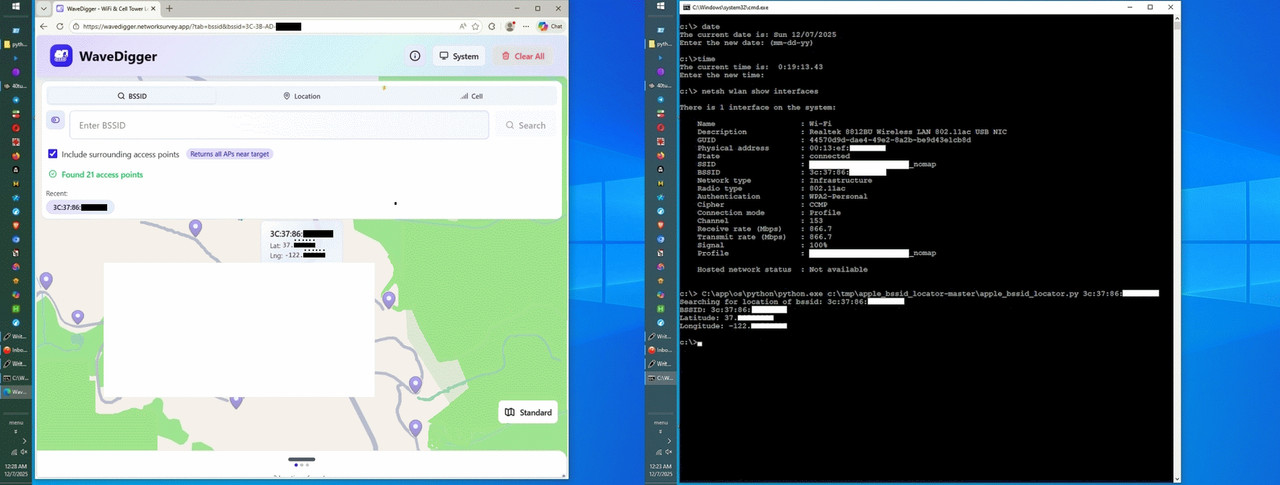
also pulls in the surrounding access points that Apple's Wi-Fi Positioning System has observed in the same area.... just... try this...
Windows:
1. Press Win+R
2. Type: cmd
3. In the command prompt, type:
netsh wlan show networks mode=bssid
4. Look for your SSID name
5. Under it, find "BSSID" lines
6. Copy the MAC address (format: AA:BB:CC:DD:EE:FF)
Linux:
1. Open a terminal
2. Type: sudo iwlist scan
3. Find your SSID in the output
4. Look for "Address:" lines
5. Copy the MAC address (format: AA:BB:CC:DD:EE:FF)
MacOS:
1. Open a terminal
2. Type: airport -s
3. Find your SSID in the list
4. Copy the BSSID shown (format: AA:BB:CC:DD:EE:FF)
Once you have the BSSID, you can paste it into WaveDigger lookup tool.
1. Open the WaveDigger site:
https://wavedigger.networksurvey.app/?tab=bssid
2. In the "BSSID" field, type your MAC address:
11:22:33:AA:BB:CC
3. Click the "Lookup" or "Search" button.
4. The map will show the location of that access point.
If you enable "include surrounding access points",
it will also list nearby BSSIDs Apple has observed.
Once you have the BSSID of all your neighbors, if one of them moves to a
new house, you can track them if they use their router at the new home.
On 2025-12-05 06:06, Char Jackson wrote:<snip>
I don't see anything complex there, but we don't all have the same
background.
Because that is the simple setup mode. You don't see there the virtual >networks (VLANS) it has, for instance.
On 2025/12/5 19:56:5, Jolly Roger wrote:
On 2025-12-05, J. P. Gilliver <G6JPG@255soft.uk> wrote:I wasn't bitching - just suggesting you might not want to appear
On 2025/12/5 17:37:43, Jolly Roger wrote:
E-mail sent to this address may be devoured by my ravenous SPAM
filter. I often ignore posts from Google. Use a real news client
instead.
I'm guessing that was composed when Google Groups was still operating?
If it was, maybe you might want to amend it ...
The last person who bitched about this signature is a resident troll, so
it stays.
out-of-date (how long is it now since Google Groups posts ceased
appearing?); it doesn't _bother_ me.
On Fri, 5 Dec 2025 11:06:25 +0100, "Carlos E.R."
<robin_listas@es.invalid> wrote:
On 2025-12-05 06:06, Char Jackson wrote:<snip>
I don't see anything complex there, but we don't all have the same
background.
Because that is the simple setup mode. You don't see there the virtual
networks (VLANS) it has, for instance.
In the early 2000s I used to think that dd-wrt router firmware was
complex, but the fog clears over time. It includes vlans, among many
other things.
On 2025-12-05 16:49, Marian wrote:
Chris wrote:
Since WaveDigger has a special query mode where you can enter a single
SSID
or BSSID, and instead of just returning that access point's location, it
also pulls in the surrounding access points that Apple's Wi-Fi
Positioning
System has observed in the same area.... just... try this...
Linux:
1. Open a terminal
2. Type: sudo iwlist scan
3. Find your SSID in the output
4. Look for "Address:" lines
5. Copy the MAC address (format: AA:BB:CC:DD:EE:FF)
Once you have the BSSID, you can paste it into WaveDigger lookup tool.
1. Open the WaveDigger site:
https://wavedigger.networksurvey.app/?tab=bssid
2. In the "BSSID" field, type your MAC address:
11:22:33:AA:BB:CC
3. Click the "Lookup" or "Search" button.
4. The map will show the location of that access point.
If you enable "include surrounding access points",
it will also list nearby BSSIDs Apple has observed.
Once you have the BSSID of all your neighbors, if one of them moves to a
new house, you can track them if they use their router at the new home.
Except you won't know WHICH of the BSSIDs that are returned belong to
your neighbours.
From WaveDigger (the site you didn't know about until I told you):
"Access points shown may be 1-2km away from your click location."
So?
Chris wrote:
It still just boils down to knowing my home address. Which is already
public knowledge.
Hi Chris,
You're smarter than that.
I get it that all the Apple trolls are desperate to minimize the privacy implications of what has widely been reported as a privacy nightmare.
You Apple trolls always defend everything Apple to the death.
No matter what.
So it's natural that you and Jolly Roger claim that Apple's invasion of our privacy is, in the words of Jolly Roger "a nothing burger".
But you need to realize privacy professionals out there disagree with you.
*Why Your Wi-Fi Router Doubles as an Apple AirTag*
<https://krebsonsecurity.com/2024/05/why-your-wi-fi-router-doubles-as-an-apple-airtag/>
For you Apple trolls to claim the security professionals are wrong
is your
own way of defending everything Apple does, to the death, no matter what.
*Surveilling the Masses with Wi-Fi-Based Positioning Systems*
<https://par.nsf.gov/servlets/purl/10540853>
Luckily, of all the Apple trolls, you're one who sometimes can exercise critical thinking processes, so allow me to give you a local example.
Since WaveDigger has a special query mode where you can enter a single SSID or BSSID, and instead of just returning that access point's location, it
also pulls in the surrounding access points that Apple's Wi-Fi Positioning System has observed in the same area.... just... try this...
Windows:
1. Press Win+R
2. Type: cmd
3. In the command prompt, type:
netsh wlan show networks mode=bssid
4. Look for your SSID name
5. Under it, find "BSSID" lines
6. Copy the MAC address (format: AA:BB:CC:DD:EE:FF)
Linux:
1. Open a terminal
2. Type: sudo iwlist scan
3. Find your SSID in the output
4. Look for "Address:" lines
5. Copy the MAC address (format: AA:BB:CC:DD:EE:FF)
MacOS:
1. Open a terminal
2. Type: airport -s
3. Find your SSID in the list
4. Copy the BSSID shown (format: AA:BB:CC:DD:EE:FF)
Once you have the BSSID, you can paste it into WaveDigger lookup tool.
1. Open the WaveDigger site:
https://wavedigger.networksurvey.app/?tab=bssid
2. In the "BSSID" field, type your MAC address:
11:22:33:AA:BB:CC
3. Click the "Lookup" or "Search" button.
4. The map will show the location of that access point.
If you enable "include surrounding access points",
it will also list nearby BSSIDs Apple has observed.
Once you have the BSSID of all your neighbors, if one of them moves to a
new house, you can track them if they use their router at the new home.
Marian <marianjones@helpfulpeople.com> wrote:
Chris wrote:
Linux:
1. Open a terminal
2. Type: sudo iwlist scan
3. Find your SSID in the output
4. Look for "Address:" lines
5. Copy the MAC address (format: AA:BB:CC:DD:EE:FF)
"enp0s1 Interface doesn't support scanning"
On 2025-12-06 13:58, Chris wrote:
Marian <marianjones@helpfulpeople.com> wrote:
Chris wrote:
Linux:
1. Open a terminal
2. Type: sudo iwlist scan
3. Find your SSID in the output
4. Look for "Address:" lines
5. Copy the MAC address (format: AA:BB:CC:DD:EE:FF)
"enp0s1 Interface doesn't support scanning"
This Linux command is correct, except that it tries all network
interfaces, including some that work for the purpose and some that do
not. And on those it prints that informative error message.
XXX:~ # iwlist scan
lo Interface doesn't support scanning.
eth0 Interface doesn't support scanning.
wlan1 Scan completed :
Cell 01 - Address: AA:BB:CC:DD:EE:FF
Channel:116
Frequency:5.58 GHz (Channel 116)
Quality=70/70 Signal level=-28 dBm
Encryption key:on
ESSID:"Some name"
...
...
Except you won't know WHICH of the BSSIDs that are returned belong to
your neighbours.
From WaveDigger (the site you didn't know about until I told you):
"Access points shown may be 1-2km away from your click location."
So?
It showed mine just 20 or 30 metres to the west. At the other side of
the street.
May be 1-2 km away... doesn't mean they all are off. Just that there is
no warranty that it is accurate.
Only you are making out that it is a privacy nightmare and it drives you to change your behaviour.
It has no negative impact on ordinary people.
We now know from your inability to come up with a way to actually track me that what is required is knowledge of a WAP's MAC address. This is only
known by being in direct contact with the WAP (to read the sticker) or connected to it. Both of which mean you'll find out the location when you
are AT THE LOCATION.
You're a moron if you think this is a problem.
You Apple trolls always defend everything Apple to the death.
No matter what.
Incorrect. You're pushing an invalid narrative, which needs to be
addressed.
But you need to realize privacy professionals out there disagree with you. >> *Why Your Wi-Fi Router Doubles as an Apple AirTag*
<https://krebsonsecurity.com/2024/05/why-your-wi-fi-router-doubles-as-an-apple-airtag/>
That's a clickbait article. Nowhere does it explain how a domestic, mains powered router is like a battery powered device that fits on a keychain.
To many people Airtags and the like are a *good* thing. Mullins have been sold.
The only real scenario they demonstrate as being a genuine risk is being in
a warzone like Ukraine and Gaza. Again, of no relevance to 99.999% of
people. Am pretty sure the Santa Cruz mountains aren't awarzone.
For you Apple trolls to claim the security professionals are wrong
Incorrect. No-one is saying that. We're saying you're wrong. As per usual.
Amazon should ask for their money back for your "reviews". Oh wait they can't, because you give away your time to a multi-billion dollar company
for free!! What an utter moron.
Honestly, your world sounds *exhausting*.
The very fact Amazon selected me, where they only choose the top
half million or so reviewers to invite to Vine, says something.
Carlos E.R. wrote:
Except you won't know WHICH of the BSSIDs that are returned belong to
your neighbours.
From WaveDigger (the site you didn't know about until I told you):
"Access points shown may be 1-2km away from your click location."
So?
It showed mine just 20 or 30 metres to the west. At the other side of
the street.
May be 1-2 km away... doesn't mean they all are off. Just that there is
no warranty that it is accurate.
Where I live, it's so accurate as to make my heart palpitate in shock.
However, I see what Alan Baker wrote based on your inclusion of his post,
but he's dead wrong (as always), but I can't fault Alan Baker for being
dead wrong about everything as his IQ is well below anything normal.
For people like you, Chris,
I can point out that when I look at the
database, given our homes are far apart, it's trivial to identify the exact neighbor with the exact BSSID.
So while you must be aware I don't advocate tracking your neighbors, one answer to your question of how I could track YOU is if you were one of my neighbors.
If YOU were one of my neighbors, that query would show me exactly where YOU live and exactly what your BSSID is, which I could use to track you for as long as you use that particular router.
For example, if you moved away, but if you re-used your router, then I
would know EXACTLY where you lived, if you moved to another sparse location such as mine is.
I did NOT check for access points in the middle of Los Angeles though,
where I'd suspect Alan Baker's comment is more apropos given the density of access points would be far greater than it is out here in the boonies.
On 2025-12-06 02:18, Alan wrote:
On 2025-12-05 16:49, Marian wrote:
Chris wrote:
Since WaveDigger has a special query mode where you can enter a
single SSID
or BSSID, and instead of just returning that access point's location, it >>> also pulls in the surrounding access points that Apple's Wi-Fi
Positioning
System has observed in the same area.... just... try this...
Linux:
1. Open a terminal
2. Type: sudo iwlist scan
3. Find your SSID in the output
4. Look for "Address:" lines
5. Copy the MAC address (format: AA:BB:CC:DD:EE:FF)
iwlist scan | grep "Address:\|SSID"
...
Once you have the BSSID, you can paste it into WaveDigger lookup tool.
1. Open the WaveDigger site:
https://wavedigger.networksurvey.app/?tab=bssid
2. In the "BSSID" field, type your MAC address:
11:22:33:AA:BB:CC
3. Click the "Lookup" or "Search" button.
4. The map will show the location of that access point.
If you enable "include surrounding access points",
it will also list nearby BSSIDs Apple has observed.
Once you have the BSSID of all your neighbors, if one of them moves to a >>> new house, you can track them if they use their router at the new home.
Except you won't know WHICH of the BSSIDs that are returned belong to
your neighbours.
From WaveDigger (the site you didn't know about until I told you):
"Access points shown may be 1-2km away from your click location."
So?
It showed mine just 20 or 30 metres to the west. At the other side of
the street.
May be 1-2 km away... doesn't mean they all are off. Just that there is
no warranty that it is accurate.
On 2025-12-06 05:59, Char Jackson wrote:
On Fri, 5 Dec 2025 11:06:25 +0100, "Carlos E.R."
<robin_listas@es.invalid> wrote:
On 2025-12-05 06:06, Char Jackson wrote:<snip>
I don't see anything complex there, but we don't all have the same
background.
Because that is the simple setup mode. You don't see there the virtual
networks (VLANS) it has, for instance.
In the early 2000s I used to think that dd-wrt router firmware was
complex, but the fog clears over time. It includes vlans, among many
other things.
When I say that my ISP setup of the router is complex, I mean things
like that the setup includes 3 active VLANs, and more things. If I buy
my own router, first I have to decode out the entire setup of the old >router, and then replicate it in the new router. Ie, create again those
3 VLANs, and every other thing they did, which are not documented. You
have to reverse engineer the setup of the provided router.
I also opt out by adding _optout_ & _nomap to the SSID.
b. This (supposedly) removes my privacy information from the servers
Chris wrote:
Only you are making out that it is a privacy nightmare and it drives you to >> change your behaviour.
<https://www.cs.umd.edu/~dml/papers/wifi-surveillance-sp24.pdf>
"In this work, we show that Apples WPS implementation
can easily be abused to create a serious privacy threat
on a global scale."
It has no negative impact on ordinary people.
I get it that you Apple trolls always defend Apple to the death, no matter what, but all I will ask of you (given the listing above) is for you to...
*Find even a single security researcher who agrees with you.*
<https://www.govinfosecurity.com/surveillance-risk-apples-wifi-based-positioning-system-a-25330>
"The attack risk stems from Apple's WiFi-based Positioning System"
We now know from your inability to come up with a way to actually track me >> that what is required is knowledge of a WAP's MAC address. This is only
known by being in direct contact with the WAP (to read the sticker) or
connected to it. Both of which mean you'll find out the location when you
are AT THE LOCATION.
Notice that, where I live, in the mountains high above Silicon Valley, the query we discussed prior shows EXACTLY the EXACT BSSID of all my neighbors.
It's EXACT, Chris.
It's horrifyingly exact, Chris.
I almost had a heart attack when I saw how clearly I could identify each
and every one of my neighbors by their exact location and BSSID, Chris.
What's worse, since Apple's WPS database has no security control
whatsoever, anyone in the world can do easily what I just did, Chris.
All of us can be tracked. And it's not just me saying it.
Read the papers, Chris. Read them.
*Find even a single security researcher who agrees with you.*
<https://arxiv.org/abs/2405.14975>
"In this work, we show that Apple's flawed WPS can too easily be abused"
You're a moron if you think this is a problem.
It's a given
But you need to realize privacy professionals out there disagree with you. >>> *Why Your Wi-Fi Router Doubles as an Apple AirTag*
<https://krebsonsecurity.com/2024/05/why-your-wi-fi-router-doubles-as-an-apple-airtag/>
That's a clickbait article. Nowhere does it explain how a domestic, mains
powered router is like a battery powered device that fits on a keychain.
Well, Brian Krebs is a well-known well-respected researcher, is he not?
Andy Burns <usenet@andyburns.uk> wrote:
Frank Slootweg wrote:
Andy Burns wrote:
In the UK (and I assume wider within Europe) many ISPs do remote
provisioning using TR-069 protocol.
Do you know the extent of that "provisioning", i.e. what they can and
can not do?
quite likely change all settings and do firmware updates, reboots
Also of the router part, i.e. router settings, passwords, IP settings, etc.?
If so, how is the user's ('LAN') still his/hers and still secure? How
about the user being liable for any abuse/misuse from the ISP's side/ personel?
Over time (some 20+ years), my modem/router devices have either been
installed by an on-site technician (probably two times) or by myself,
i.e. they ship a replacement modem/router (sometimes with things like
cables, adapters, outlets, etc.) and I install it (probably three or
more times).
I generally start with the ISP's device, then migrate to my own device,
but the I've stayed with same ISP since 2004
Over time, I have used two of my own routers. The first one was
needed, because the modem only had one hardwired connection. The second, because the first was too slow (bps). After that, I've used the ISP's built-in routers because they offered sufficient functionality. And yes,
also since about that time (March 2003 actually).
Here is how to opt out of the following databases
In the early 2000s I used to think that dd-wrt router firmware was
complex, but the fog clears over time. It includes vlans, among many
other things.
When I say that my ISP setup of the router is complex, I mean things
like that the setup includes 3 active VLANs, and more things. If I buy
my own router, first I have to decode out the entire setup of the old >>router, and then replicate it in the new router. Ie, create again those
3 VLANs, and every other thing they did, which are not documented. You >>have to reverse engineer the setup of the provided router.
I don't see anything complex about setting up consumer networking gear,
but I'll take your word for it.
In the early days the WRT-54G had enough memory to flash DD-WRT on it
On 2025/12/5 19:56:5, Jolly Roger wrote:
On 2025-12-05, J. P. Gilliver <G6JPG@255soft.uk> wrote:
On 2025/12/5 17:37:43, Jolly Roger wrote:
E-mail sent to this address may be devoured by my ravenous SPAM
filter. I often ignore posts from Google. Use a real news client
instead.
I'm guessing that was composed when Google Groups was still operating?
If it was, maybe you might want to amend it ...
The last person who bitched about this signature is a resident troll, so
it stays.
I wasn't bitching
Char Jackson wrote:
In the early 2000s I used to think that dd-wrt router firmware was
complex, but the fog clears over time. It includes vlans, among many
other things.
When I say that my ISP setup of the router is complex, I mean things
like that the setup includes 3 active VLANs, and more things. If I buy
my own router, first I have to decode out the entire setup of the old
router, and then replicate it in the new router. Ie, create again those
3 VLANs, and every other thing they did, which are not documented. You
have to reverse engineer the setup of the provided router.
I don't see anything complex about setting up consumer networking gear,
but I'll take your word for it.
I agree with Char Jackson, who has helped me over the years to set up old Linksys & Netgear routers on DD-WRT as bridges (and as bridge repeaters).
In all those years, I haven't explicitly run into VLANs but implicitly many guest networks and repeater bridges make use of VLANs as far as I'm aware.
On 2025-12-06 04:24, Carlos E.R. wrote:
On 2025-12-06 02:18, Alan wrote:
On 2025-12-05 16:49, Marian wrote:
Chris wrote:
Since WaveDigger has a special query mode where you can enter a
single SSID
or BSSID, and instead of just returning that access point's
location, it
also pulls in the surrounding access points that Apple's Wi-Fi
Positioning
System has observed in the same area.... just... try this...
Linux:
1. Open a terminal
2. Type: sudo iwlist scan
3. Find your SSID in the output
4. Look for "Address:" lines
5. Copy the MAC address (format: AA:BB:CC:DD:EE:FF)
iwlist scan | grep "Address:\|SSID"
...
Once you have the BSSID, you can paste it into WaveDigger lookup tool. >>>> 1. Open the WaveDigger site:Except you won't know WHICH of the BSSIDs that are returned belong to
https://wavedigger.networksurvey.app/?tab=bssid
2. In the "BSSID" field, type your MAC address:
11:22:33:AA:BB:CC
3. Click the "Lookup" or "Search" button.
4. The map will show the location of that access point.
If you enable "include surrounding access points",
it will also list nearby BSSIDs Apple has observed.
Once you have the BSSID of all your neighbors, if one of them moves
to a
new house, you can track them if they use their router at the new home. >>>
your neighbours.
From WaveDigger (the site you didn't know about until I told you):
"Access points shown may be 1-2km away from your click location."
So?
It showed mine just 20 or 30 metres to the west. At the other side of
the street.
May be 1-2 km away... doesn't mean they all are off. Just that there
is no warranty that it is accurate.
Which means you cannot trust that any information returned is accurate.
Makes for a pretty bad way to track someone...
...assuming you had some way to associate someone's identity with the--
BSSID of their WiFi in the first place.
On 2025-12-07 01:10, Alan wrote:Except you first have to find a way to associate the BSSID with a
On 2025-12-06 04:24, Carlos E.R. wrote:
On 2025-12-06 02:18, Alan wrote:
On 2025-12-05 16:49, Marian wrote:
Chris wrote:
Since WaveDigger has a special query mode where you can enter a
single SSID
or BSSID, and instead of just returning that access point's
location, it
also pulls in the surrounding access points that Apple's Wi-Fi
Positioning
System has observed in the same area.... just... try this...
Linux:
1. Open a terminal
2. Type: sudo iwlist scan
3. Find your SSID in the output
4. Look for "Address:" lines
5. Copy the MAC address (format: AA:BB:CC:DD:EE:FF)
iwlist scan | grep "Address:\|SSID"
...
Once you have the BSSID, you can paste it into WaveDigger lookup tool. >>>>> 1. Open the WaveDigger site:
https://wavedigger.networksurvey.app/?tab=bssid
2. In the "BSSID" field, type your MAC address:
11:22:33:AA:BB:CC
3. Click the "Lookup" or "Search" button.
4. The map will show the location of that access point.
If you enable "include surrounding access points",
it will also list nearby BSSIDs Apple has observed.
Once you have the BSSID of all your neighbors, if one of them moves >>>>> to a
new house, you can track them if they use their router at the new
home.
Except you won't know WHICH of the BSSIDs that are returned belong
to your neighbours.
From WaveDigger (the site you didn't know about until I told you):
"Access points shown may be 1-2km away from your click location."
So?
It showed mine just 20 or 30 metres to the west. At the other side of
the street.
May be 1-2 km away... doesn't mean they all are off. Just that there
is no warranty that it is accurate.
Which means you cannot trust that any information returned is accurate.
Makes for a pretty bad way to track someone...
Much better than looking on the entire world. That's pretty good, actually.
On 2025-12-06, J. P. Gilliver <G6JPG@255soft.uk> wrote:
On 2025/12/5 19:56:5, Jolly Roger wrote:
On 2025-12-05, J. P. Gilliver <G6JPG@255soft.uk> wrote:
On 2025/12/5 17:37:43, Jolly Roger wrote:
E-mail sent to this address may be devoured by my ravenous SPAM
filter. I often ignore posts from Google. Use a real news client
instead.
I'm guessing that was composed when Google Groups was still operating? >>>> If it was, maybe you might want to amend it ...
The last person who bitched about this signature is a resident troll, so >>> it stays.
I wasn't bitching
It's not about you.
Marian wrote:I did wonder; his posts are appearing here (in Thunderbird) in a
Here is how to opt out of the following databases
Going chinese? You've swapped into charset="big5" and the weird italic
font that usually uses.
On 2025-12-07 11:54, Carlos E.R. wrote:
On 2025-12-07 01:10, Alan wrote:Except you first have to find a way to associate the BSSID with a
On 2025-12-06 04:24, Carlos E.R. wrote:
On 2025-12-06 02:18, Alan wrote:
On 2025-12-05 16:49, Marian wrote:
Chris wrote:
Since WaveDigger has a special query mode where you can enter a
single SSID
or BSSID, and instead of just returning that access point's
location, it
also pulls in the surrounding access points that Apple's Wi-Fi
Positioning
System has observed in the same area.... just... try this...
Linux:
1. Open a terminal
2. Type: sudo iwlist scan
3. Find your SSID in the output
4. Look for "Address:" lines
5. Copy the MAC address (format: AA:BB:CC:DD:EE:FF)
iwlist scan | grep "Address:\|SSID"
...
Once you have the BSSID, you can paste it into WaveDigger lookup
tool.
1. Open the WaveDigger site:
https://wavedigger.networksurvey.app/?tab=bssid
2. In the "BSSID" field, type your MAC address:
11:22:33:AA:BB:CC
3. Click the "Lookup" or "Search" button.
4. The map will show the location of that access point.
If you enable "include surrounding access points",
it will also list nearby BSSIDs Apple has observed.
Once you have the BSSID of all your neighbors, if one of
them moves to a new house, you can track them if they use
their router at the new home.
Except you won't know WHICH of the BSSIDs that are returned belong
to your neighbours.
From WaveDigger (the site you didn't know about until I told you): >>>>>
"Access points shown may be 1-2km away from your click location."
So?
It showed mine just 20 or 30 metres to the west. At the other side
of the street.
May be 1-2 km away... doesn't mean they all are off. Just that there
is no warranty that it is accurate.
Which means you cannot trust that any information returned is accurate.
Makes for a pretty bad way to track someone...
Much better than looking on the entire world. That's pretty good,
actually.
particular individual.
On 2025/12/7 17:38:11, Jolly Roger wrote:
On 2025-12-06, J. P. Gilliver <G6JPG@255soft.uk> wrote:In that case, I don't understand your comment.
On 2025/12/5 19:56:5, Jolly Roger wrote:
On 2025-12-05, J. P. Gilliver <G6JPG@255soft.uk> wrote:
On 2025/12/5 17:37:43, Jolly Roger wrote:
E-mail sent to this address may be devoured by my ravenous SPAM
filter. I often ignore posts from Google. Use a real news client
instead.
I'm guessing that was composed when Google Groups was still operating? >>>>> If it was, maybe you might want to amend it ...
The last person who bitched about this signature is a resident troll, so >>>> it stays.
I wasn't bitching
It's not about you.
On 2025/12/7 16:6:36, Andy Burns wrote:
Marian wrote:
Here is how to opt out of the following databases
Going chinese? You've swapped into charset="big5" and the weird italic
font that usually uses.
I did wonder; his posts are appearing here (in Thunderbird) in a
different font to everyone else's. It's not italic, and I think it is monospaced; other than that it looks maybe a bit like Times but
stretched vertically.
Except you first have to find a way to associate the BSSID with aWhich means you cannot trust that any information returned is accurate. >>>>
Makes for a pretty bad way to track someone...
Much better than looking on the entire world. That's pretty good,
actually.
particular individual.
Sure.
You're trying claim that using an internet database of anonymous
information is a more serious risk than looking out of your own window.
You're claiming that the telephone books we all used to have are a serious privacy risk worth of a class action suit. LMAO.
For example, if you moved away, but if you re-used your router, then I
would know EXACTLY where you lived, if you moved to another sparse location >> such as mine is.
That's a lot of "ifs".
As you well know the scenarios shown are disasters or warzones. Which
aren't of relevance to civilians as they have far more serious issues to worry about.
They also report that 0.06% of all APs moved month to month. That's a
really poor hit rate for "tracking" people.
I almost had a heart attack when I saw how clearly I could identify each
and every one of my neighbors by their exact location and BSSID, Chris.
That is the exact point of it. It would be a pretty terrible service if it couldn't identify unique buildings within 40 acre plots. lol.
All of us can be tracked. And it's not just me saying it.
Read the papers, Chris. Read them.
Literally says 0.06% of APs move . That's nowhere near "all of us".
Marian wrote:
In the early days the WRT-54G had enough memory to flash DD-WRT on it
Still have one kicking around ... not powerful enough for anything
useful these days.
I agree with Char Jackson, who has helped me over the years to set up old
Linksys & Netgear routers on DD-WRT as bridges (and as bridge repeaters).
It is simple if someone takes the effort of describing what you have to configure in the new router. Not that easy if you have to reverse
engineer the old router and it has no comments nor help. Just the
obscure short name of a setting.
In all those years, I haven't explicitly run into VLANs but implicitly many >> guest networks and repeater bridges make use of VLANs as far as I'm aware.
Nothing implicit. One VLAN is for the phone land line, another is for
TV, another is for internet (my guess).
This is just a small part of what my router calls:
Network Setting
Bridging Setup
Bridging
Filtering
Marking
https://paste.opensuse.org/pastes/7c7fef46eaef https://paste.opensuse.org/pastes/9acdc9974acd https://paste.opensuse.org/pastes/88d9c37538af https://paste.opensuse.org/1aece5657e7a https://paste.opensuse.org/872479cefbdb https://paste.opensuse.org/a827cc71d713
just try to explain what that does. A mistake, and my phone stops
working. And there are maybe hundreds of screens like that.
No, I am not actually interested. It is just an example of why I say
that the setup of my router by the ISP is complex.
For example, if you moved away, but if you re-used your router, then I
would know EXACTLY where you lived, if you moved to another sparse location >> such as mine is.
That's a lot of "ifs".
Thunderbird. TB can use a different font for each different charset.
Content-Type: text/plain; charset="big5"
Content-Transfer-Encoding: 8bit
Content-Language: en-GB
I'm not familiar with this choice.
Here is how to opt out of the following databases
Going chinese? You've swapped into charset="big5" and the weird italic
font that usually uses.
Carlos E.R. wrote:
I agree with Char Jackson, who has helped me over the years to set up old >>> Linksys & Netgear routers on DD-WRT as bridges (and as bridge repeaters). >>>
It is simple if someone takes the effort of describing what you have to
configure in the new router. Not that easy if you have to reverse
engineer the old router and it has no comments nor help. Just the
obscure short name of a setting.
I must exclaim that I AGREE with Carlos, since I never disagree with
anyone, no matter who they are, who presents a logically sensible view.
We've all struggled to understand what a given switch meant when setting up
a router, where I remember, I even struggled when I moved into the
mountains to figure out which port of a POE goes to the radio versus
router. After scores of POEs, over time, we forget we had to learn it.
However...
There is one really good thing that came up only in the last year or so.
You can now ask AI/LLM how to set up your router & it will help you do it.
In all those years, I haven't explicitly run into VLANs but implicitly many >>> guest networks and repeater bridges make use of VLANs as far as I'm aware. >>Nothing implicit. One VLAN is for the phone land line, another is for
TV, another is for internet (my guess).
This is just a small part of what my router calls:
Network Setting
Bridging Setup
Bridging
Filtering
Marking
https://paste.opensuse.org/pastes/7c7fef46eaef
https://paste.opensuse.org/pastes/9acdc9974acd
https://paste.opensuse.org/pastes/88d9c37538af
https://paste.opensuse.org/1aece5657e7a
https://paste.opensuse.org/872479cefbdb
https://paste.opensuse.org/a827cc71d713
just try to explain what that does. A mistake, and my phone stops
working. And there are maybe hundreds of screens like that.
No, I am not actually interested. It is just an example of why I say
that the setup of my router by the ISP is complex.
The RTF8225VW Router Smart WiFi 6 Go is Movistar's latest
Askey-manufactured router whose configuration guide is here.
<https://itigic.com/movistar-router-smart-wifi-6-manual-configuration-guide/>
The bridge mode support apparently lets you connect a neutral router (like TP-Link or Asus) to manage your network, avoiding double NAT.
<https://algoentremanos.com/como-configurar-router-movistar-smart-wifi-6-go-rtf8225vw-modo-bridge/>
Moviestart can push the firmware updates if you don't want to do it.
<https://comunidad.movistar.es/discussions/soporte-fibra-optica/ultimo-firmware-router-smart-wifi-go-router-askey-rtf8225vw/5181231>
You appear to be using bridge mode which is optional.
a. Advanced Settings > Internet > Bridge Mode.
b. Then connect your home router to the RTF8225VW.
Chris wrote:
They also report that 0.06% of all APs moved month to month. That's a
really poor hit rate for "tracking" people.
Any imaginative person can think of many instances where having a database
of all the people who moved and exact where from and to, is useful.
Let's just say California wanted to find all the people who moved from California to Florida who retired to ask them to pay their 401K taxes.
It would be trivial, using Apple's WPS system, to find everyone in any
given county in Florida who recently moved there from California.
Marian wrote:
Maybe you can explain what happens with fonts as I've never understood
how
they show up for people like you who are on the receiving end of my
posts.
I write the content in gVim and I send it off with telnet.
Everything in the header related to the newsreader is essentially random.
Specifically, whatever the header "says" about fonts, is random.
It's not "completely" random as the header lines are "scraped".
Carlos E.R. wrote:> No, the font used is chosen locally by your client, which I take to be
Thunderbird. TB can use a different font for each different charset.
Content-Type: text/plain; charset="big5"
Content-Transfer-Encoding: 8bit
Content-Language: en-GB
I'm not familiar with this choice.
Andy found a flaw in my newsreader, which is a custom unique newsreader.
In that newsreader, there's one thing I've never figured out, which is
how fonts work in Usenet (since most lines in my header are completely random).
As you know, I have a unique newsreader which is simply telnet with gVim.
The scripts don't care what fonts are used. It's just a line to telnet.
The header lines not added by the nntp server are added by my scripts.
But they're essentially random.
I got the lines, long ago, from scraping Usenet for header lines.
So some newsreaders tended to have one set of font lines, while other newsreaders tended to have a different set of font lines. It's random.
They change whenever I flip a switch to the next dictionary lookup.
I'll do that right now so that you can see different header lines.
I have no idea how the header lines look to the recipient though.
Nor how the fonts are interpreted as they're always sent the same.
But nothing has changed in that I'm still using telnet with gVim.
Carlos E.R. wrote:
Except you first have to find a way to associate the BSSID with aWhich means you cannot trust that any information returned is accurate. >>>>>
Makes for a pretty bad way to track someone...
Much better than looking on the entire world. That's pretty good,
actually.
particular individual.
Sure.
I just want the people here to understand that when your BSSID is in
Apple's database, and if you live in a rural area (such as I do),
then your GPS coordinates returned to 8 decimal places... is you.
If you move, then they can track where you moved.
For example, an enterprising coder could query the Apple WPS database for
all routers that moved between locations to put them into a database.
Then they could sell that database to professionals who target people who just moved. That's only one example, as I'm not that type of person.
It could be more nefarious in that with Apple's insecure WPS database, you can *target* individuals, which again, I don't advocate but it can be done.
But the fact is you can be tracked anywhere in the world if you use the
same router, which very often people who have moved will easily do.
Marian <marianjones@helpfulpeople.com> wrote:
Chris wrote:
They also report that 0.06% of all APs moved month to month. That's a
really poor hit rate for "tracking" people.
Any imaginative person can think of many instances where having a database >> of all the people who moved and exact where from and to, is useful.
Not people. WAPs.
Let's just say California wanted to find all the people who moved from
California to Florida who retired to ask them to pay their 401K taxes.
It would be trivial, using Apple's WPS system, to find everyone in any
given county in Florida who recently moved there from California.
Go on then. If it's so trivial, why don't you do it?
Show us with step by step instructions how many *people* - as you claim - moved to FL from CA in the last six months.
You have a week. If you can't then I call bullshit.
I know what will happen, however. You won't even try. You will cry, shout
and stomp your feet blaming everyone else apart from yourself. Just like a big baby.
You'll not hear from me until next week so as to not direct you from this important privacy risk study.
Maybe you can explain what happens with fonts as I've never understood
how
they show up for people like you who are on the receiving end of my
posts.
The receiver controls the font, but modified based on certain charsets,
e.g. Chinese tend to use "big5" and Thunderbird will use either a YaHei
or SimSun font for that, which always looks like a low quality scratchy
font on my machines ... someone else described it as "stretched
vertically Times Roman"
<https://fontsgeek.com/fonts/SimSun-Regular>
I write the content in gVim and I send it off with telnet.
Everything in the header related to the newsreader is essentially random. >>>
Specifically, whatever the header "says" about fonts, is random.
It's not "completely" random as the header lines are "scraped".
Maybe any scraped sample headers that you randomly include into postings should exclude those with charset big5, or koi8 (similar for russian)
But nothing has changed in that I'm still using telnet with gVim.
But you have to be careful about what your random headers do to us. You should not use random headers in things like the charset.
Any imaginative person can think of many instances where having a database >> of all the people who moved and exact where from and to, is useful.
Not people. WAPs.
Let's just say California wanted to find all the people who moved from
California to Florida who retired to ask them to pay their 401K taxes.
It would be trivial, using Apple's WPS system, to find everyone in any
given county in Florida who recently moved there from California.
Go on then. If it's so trivial, why don't you do it?
Show us with step by step instructions how many *people* - as you claim - moved to FL from CA in the last six months.
You have a week. If you can't then I call bullshit.
I know what will happen, however. You won't even try. You will cry, shout
and stomp your feet blaming everyone else apart from yourself. Just like a big baby.
You'll not hear from me until next week so as to not direct you from this important privacy risk study.
But the fact is you can be tracked anywhere in the world if you use the
same router, which very often people who have moved will easily do.
Considering that here the router is often provided by the Telco, when
you move you have to hand over the old router, and get a new one with
the new contract at the new destination.
You'll not hear from me until next week so as to not direct you from this
important privacy risk study.
His point is correct, though. An interested party could dig out this information...
You appear to be using bridge mode which is optional.
a. Advanced Settings > Internet > Bridge Mode.
b. Then connect your home router to the RTF8225VW.
No, I am not using bridge mode. I'm using the normal default mode as it comes out of the box, prepared to work with telefónica, then added a few things, like my SSID/Password, dhcp range to use, what ports I want translated, etc.
the post you said was in
Chinese fonts was no different, on my side, than any other post from me.
On 2025-12-08 08:54, Chris wrote:
Marian <marianjones@helpfulpeople.com> wrote:
Chris wrote:
They also report that 0.06% of all APs moved month to month. That's a
really poor hit rate for "tracking" people.
Any imaginative person can think of many instances where having a database >>> of all the people who moved and exact where from and to, is useful.
Not people. WAPs.
Let's just say California wanted to find all the people who moved from
California to Florida who retired to ask them to pay their 401K taxes.
It would be trivial, using Apple's WPS system, to find everyone in any
given county in Florida who recently moved there from California.
Go on then. If it's so trivial, why don't you do it?
Show us with step by step instructions how many *people* - as you claim -
moved to FL from CA in the last six months.
You have a week. If you can't then I call bullshit.
I know what will happen, however. You won't even try. You will cry, shout
and stomp your feet blaming everyone else apart from yourself. Just like a >> big baby.
You'll not hear from me until next week so as to not direct you from this
important privacy risk study.
His point is correct, though. An interested party could dig out this information, even if Arlen doesn't come out with code to do it.
Chris wrote:
Any imaginative person can think of many instances where having a database >>> of all the people who moved and exact where from and to, is useful.
Not people. WAPs.
My AP BSSID is me. It's nobody else. It's me. To 8 decimal places, it's me. They have my name. My address. Everything. My BSSID is me.
Why do you think I redacted my BSSID in the screenshots I provided you? <https://i.postimg.cc/C5Pcb6RQ/decimal.jpg>
I even published a tutorial for how you can track BSSID's, Chris.
I published that tutorial on Saturday. To prove the point it's easy.
Let's just say California wanted to find all the people who moved from
California to Florida who retired to ask them to pay their 401K taxes.
It would be trivial, using Apple's WPS system, to find everyone in any
given county in Florida who recently moved there from California.
Go on then. If it's so trivial, why don't you do it?
Show us with step by step instructions how many *people* - as you claim -
moved to FL from CA in the last six months.
You have a week. If you can't then I call bullshit.
You are nuts. It's so trivial that you must be nuts to not realize it is.
I did it already. I already wrote the code. I already published the code.
I published the code on Saturday already.
It takes any number of BSSIDs and tracks them.
I am a bit dismayed that your argument defending Apple to the death,
no matter what, is so baseless, that I already published the code.
I know what will happen, however. You won't even try. You will cry, shout
and stomp your feet blaming everyone else apart from yourself. Just like a >> big baby.
You are nuts. I already posted the code long ago to this very newsgroup.
I wrote the tutorial for God's sake. You're nuts, Chris. Seriously. Nuts.
You claim I won't do what I already did for God's sake. You're nuts Chris.
Carlos E.R. wrote:
But the fact is you can be tracked anywhere in the world if you use the
same router, which very often people who have moved will easily do.
Considering that here the router is often provided by the Telco, when
you move you have to hand over the old router, and get a new one with
the new contract at the new destination.
I agree with anyone, no matter who they are, who posits a sensibly logical statement, where I would heartily agree with you that if you hand back the router to the telco, then you can't be tracked by subsequent use of it.
However...
The argument made by the security researchers is valid that they tracked "longitudinal" movements over the course of a year using Apple WPS. <https://par.nsf.gov/servlets/purl/10540853>
The researchers argue that Apple makes it trivial to collect millions of router locations which they can track on a massive scale because there are
no security controls whatsoever (not even a login!) for the Apple WPS db.
It doesn't take much of an imagination to understand how dangerous that is.
If Apple honored the "_nomap" & the "hidden SSID" it wouldn't be so bad.
But Apple clearly does not honor their own rules (which I can prove).
On 2025-12-08 00:10, Marian wrote:[...]
But the fact is you can be tracked anywhere in the world if you use the same router, which very often people who have moved will easily do.
Considering that here the router is often provided by the Telco, when
you move you have to hand over the old router, and get a new one with
the new contract at the new destination.
Marian <marianjones@helpfulpeople.com> wrote:
Chris wrote:
Any imaginative person can think of many instances where having a database
of all the people who moved and exact where from and to, is useful.
Not people. WAPs.
My AP BSSID is me. It's nobody else. It's me. To 8 decimal places, it's me. They have my name. My address. Everything. My BSSID is me.
Lol. Your name is a MAC address? I can see why you'd not want to disclose that.
My AP BSSID is me. It's nobody else. It's me. To 8 decimal places, it's me. >> They have my name. My address. Everything. My BSSID is me.
Lol. Your name is a MAC address? I can see why you'd not want to disclose that.
Your zip code is also "you". Is a database of zip codes that all online retailers have access to equally a serious privacy risk?
Why do you think I redacted my BSSID in the screenshots I provided you?
<https://i.postimg.cc/C5Pcb6RQ/decimal.jpg>
Understandably, you don't want to share your home address to the wider internet. We have additional information so can link you with the address.
I even published a tutorial for how you can track BSSID's, Chris.
I published that tutorial on Saturday. To prove the point it's easy.
Your "tutorial" was simply a lock-up table. There is no tracking involved. Like the majority of your tutorials, it was superfluous. Sufficient instructions already existed on the github.
You are nuts. It's so trivial that you must be nuts to not realize it is.
I did it already. I already wrote the code. I already published the code.
Ha ha ha! This is a new low for you. You're plagiarising other people's
code now?
I published the code on Saturday already.
It takes any number of BSSIDs and tracks them.
No it doesn't. The github script (not your code) only reports the location currently in the db. There is no history.
You claim I won't do what I already did for God's sake. You're nuts Chris.
Thanks for confirming your babyish attitude. Rather than rise to the challenge, you deflect and attack.
and hence his BSSID is him.
the post you said was in
Chinese fonts was no different, on my side, than any other post from me.
Presumably you have a collection of posts which you "harvest" headers
from? Maybe remove any posts with charset="big5" or charset="koi8" in
the headers from the collection ...
But the fact is you can be tracked anywhere in the world if you use the
same router, which very often people who have moved will easily do.
Considering that here the router is often provided by the Telco, when
you move you have to hand over the old router, and get a new one with
the new contract at the new destination.
And the old router might be re-used by someone else, which would lead 'Arlen' to the erroneous conclusion that you had moved to the place
where that someone lives. Way to go!
The argument made by the security researchers is valid that they tracked
"longitudinal" movements over the course of a year using Apple WPS.
<https://par.nsf.gov/servlets/purl/10540853>
Unfortunately, they give almost no details on what this year-long longitudinal study was. Unlike their month-long study which was sampled daily.
They also make reference to a six-month study for mobile routers with no specific details.
In their month-long they find that 15% of APs were "unstable" or
disappeared, 0.06% moved more than 1km and the median distance travelled
was 4km. That means 50% of APs 4km or less over the month.
Am obvious thing they should have done was to remove the mobile routers
from the global analysis. Makes interpretation harder.
Unlike you they acknowledge the APs aren't people, despite the poor
grammar.
"While there is not necessarily a 1-to-1 relationship
between Wi-Fi routers and users, home routers typically only have several."
They also make reference to a six-month study for mobile routers with no specific details.
In their month-long they find that 15% of APs were "unstable" or
disappeared, 0.06% moved more than 1km and the median distance travelled
was 4km. That means 50% of APs 4km or less over the month.
Am obvious thing they should have done was to remove the mobile routers
from the global analysis. Makes interpretation harder.
The researchers argue that Apple makes it trivial to collect millions of
router locations which they can track on a massive scale because there are >> no security controls whatsoever (not even a login!) for the Apple WPS db.
Yeah, that's a daft design decision.
It doesn't take much of an imagination to understand how dangerous that is.
Likewise an overactive imagination can catastrophise. A sense of proportionality is useful, here.
If Apple honored the "_nomap" & the "hidden SSID" it wouldn't be so bad.
But Apple clearly does not honor their own rules (which I can prove).
You have n=1. That's barely an anecdote.
I looked at my dictionaries and those words NEVER appear in them.
That makes sense since I didn't change anything for the one post that you noticed the Chinese fonts. You have to believe me on that. I didn't do it.
So you're really looking in the wrong place for the problem.
Almost certainly the problem is either how my newsserver forwards things on my side, or how your newsserver/newsreader receives things on your side.
I think what must have happened is:
a. I copied and pasted text that contained funky characters.
b. Somehow, your newsreader saw that as a Chinese character set.
It's not particularly important by now, but if you look at your message
<https://al.howardknight.net/?ID=176540312200>
it does contain big5, that's what triggered fonts, if it remains a
mystery, that doesn't bother me ...
Like I said, I never understood the Usenet character set directive.
Frank Slootweg wrote:LOL!
But the fact is you can be tracked anywhere in the world if you use the >>>> same router, which very often people who have moved will easily do.
Considering that here the router is often provided by the Telco, when
you move you have to hand over the old router, and get a new one with
the new contract at the new destination.
And the old router might be re-used by someone else, which would lead
'Arlen' to the erroneous conclusion that you had moved to the place
where that someone lives. Way to go!
If Frank is trying to intimate that this news about Apple's highly insecure WPS system can't track people, then I'm going to have to disagree with him.
Frank hates me,
On 2025-12-08 08:54, Chris wrote:
Marian <marianjones@helpfulpeople.com> wrote:
Chris wrote:
They also report that 0.06% of all APs moved month to month. That's a
really poor hit rate for "tracking" people.
Any imaginative person can think of many instances where having a
database
of all the people who moved and exact where from and to, is useful.
Not people. WAPs.
Let's just say California wanted to find all the people who moved from
California to Florida who retired to ask them to pay their 401K taxes.
It would be trivial, using Apple's WPS system, to find everyone in any
given county in Florida who recently moved there from California.
Go on then. If it's so trivial, why don't you do it?
Show us with step by step instructions how many *people* - as you claim -
moved to FL from CA in the last six months.
You have a week. If you can't then I call bullshit.
I know what will happen, however. You won't even try. You will cry, shout
and stomp your feet blaming everyone else apart from yourself. Just
like a
big baby.
You'll not hear from me until next week so as to not direct you from this
important privacy risk study.
His point is correct, though. An interested party could dig out this information, even if Arlen doesn't come out with code to do it.
Chris wrote:
Any imaginative person can think of many instances where having a
database
of all the people who moved and exact where from and to, is useful.
Not people. WAPs.
My AP BSSID is me. It's nobody else. It's me. To 8 decimal places, it's me.
On 2025-12-09 18:22, Marian wrote:
Chris wrote:
Any imaginative person can think of many instances where having a
database
of all the people who moved and exact where from and to, is useful.
Not people. WAPs.
My AP BSSID is me. It's nobody else. It's me. To 8 decimal places, it's me.
But no one but you knows which BSSID belongs to you.
Chris wrote:
My AP BSSID is me. It's nobody else. It's me. To 8 decimal places, it's me. >>> They have my name. My address. Everything. My BSSID is me.
Lol. Your name is a MAC address? I can see why you'd not want to disclose
that.
You trolls make the most absurd arguments that only you would concoct
Your zip code is also "you". Is a database of zip codes that all online
retailers have access to equally a serious privacy risk?
Jesus Christ.
Why do you think I redacted my BSSID in the screenshots I provided you?
<https://i.postimg.cc/C5Pcb6RQ/decimal.jpg>
Understandably, you don't want to share your home address to the wider
internet. We have additional information so can link you with the address.
All you'd need is my BSSID and you'd have the coordinates to my bedroom.
I even published a tutorial for how you can track BSSID's, Chris.
I published that tutorial on Saturday. To prove the point it's easy.
Your "tutorial" was simply a lock-up table. There is no tracking involved. >> Like the majority of your tutorials, it was superfluous. Sufficient
instructions already existed on the github.
Huh? Again & again, I admit I have trouble dealing with people like you
I published the code on Saturday already.
It takes any number of BSSIDs and tracks them.
No it doesn't. The github script (not your code) only reports the location >> currently in the db. There is no history.
The script is trivial, Chris.
Your IQ is too low to understand that "tracking" is just running the script
a few times. It's shocking that I have to explain something that trivial.
Here's a wrapper to track the moving location of any given set of BSSIDs. This is a permanent record a malefactor can sell over & over to bad guys.
# bssid.py
import sys
import time
# Example "BSSID database" with changing locations
bssid_database = {
"AA:BB:CC:11:22:33": [
{"name": "BSSID", "location": "GPS A"},
{"name": "BSSID", "location": "GPS B"},
{"name": "BSSID", "location": "GPS C"},
]
}
def lookup_bssid(bssid_id, step):
# simulate movement by returning different locations over time
if bssid_id in bssid_database and step < len(bssid_database[bssid_id]):
return bssid_database[bssid_id][step]
return None
def main():
bssid_ids = sys.argv[1:]
log = []
# open a log file for writing
with open("bssid_log.txt", "w") as logfile:
for step in range(3): # simulate 3 queries over time
timestamp = time.strftime("%Y-%m-%d %H:%M:%S")
for bssid_id in bssid_ids:
result = lookup_bssid(bssid_id, step)
if result:
entry = {"id": bssid_id, "time": timestamp, "location": result["location"]}
log.append(entry)
line = f"[{timestamp}] Found {result['name']} at {result['location']}\n"
print(line.strip())
logfile.write(line)
else:
line = f"[{timestamp}] bssid {bssid_id} not found\n"
print(line.strip())
logfile.write(line)
time.sleep(1) # pause to simulate time passing
# Diff successive locations
logfile.write("\n--- Movement Diff ---\n")
print("\n--- Movement Diff ---")
for bssid_id in bssid_ids:
locations = [entry["location"] for entry in log if entry["id"]
== bssid_id]
for i in range(1, len(locations)):
if locations[i] != locations[i-1]:
diff_line = f"{bssid_id} moved from {locations[i-1]} to {locations[i]}\n"
print(diff_line.strip())
logfile.write(diff_line)
if __name__ == "__main__":
main()
You claim I won't do what I already did for God's sake. You're nuts Chris. >>Thanks for confirming your babyish attitude. Rather than rise to the
challenge, you deflect and attack.
You're nuts Chris. Your IQ is so low that you claimed if I won't track people, nobody can. Who is that stupid, Chris? Seriously? Who?
It would be trivial, using Apple's WPS system, to find everyone in any
given county in Florida who recently moved there from California.
Chris wrote:
Unlike you they acknowledge the APs aren't people, despite the poor
grammar.
"While there is not necessarily a 1-to-1 relationship
between Wi-Fi routers and users, home routers typically only have several."
Again I get it that you're an Apple troll so you're desperate to make
absurd claims which make sense only to you, in that you claim "APs aren't people" (which nobody would disagree with).
Hint: No professional on the planet agrees with you. And we know that.
If Apple honored the "_nomap" & the "hidden SSID" it wouldn't be so bad. >>> But Apple clearly does not honor their own rules (which I can prove).
You have n=1. That's barely an anecdote.
I get it you Apple trolls are desperate
Carlos E.R. wrote:
You appear to be using bridge mode which is optional.
a. Advanced Settings > Internet > Bridge Mode.
b. Then connect your home router to the RTF8225VW.
No, I am not using bridge mode. I'm using the normal default mode as
it comes out of the box, prepared to work with telef�nica, then added
a few things, like my SSID/Password, dhcp range to use, what ports I
want translated, etc.
Thanks for letting us know, as bridge mode isn't something most of us have used frequently, although I've set up routers as bridges when I have a desktop that doesn't have a Wi-Fi card but which only has an RJ45 port.
1. The Windows 10 PC "thinks" it's using the Ethernet port.
2. But that is connected to the router which is set up as a bridge.
3. Then the router bridges to the Wi-Fi access point far away from the PC.
It's been a while and people like Char Jackson know this stuff way better than I do, but bridges do "funny things" sometimes.
As far as I can figure out, in my situation with a desktop & bridge
1. My PC sees only a wired Ethernet connection. It has no concept of Wi-Fi SSIDs or BSSIDs because it's not running
through a Wi-Fi NIC driver.
2. The bridge router acts as a wireless client to the upstream Wi-Fi access point. It associates with the AP using the AP's SSID and BSSID,
just like a laptop would.
3. On the Ehernet side of the bridge, it appears to be a standard
Ethernet interface to the PC. It does not expose the SSID/BSSID to the wired client as the PC can see only MAC-level Ethernet frames.
Nowadays I use a USB dongle as the Wi-Fi to the Windows 10 PC.
It acts differently than the bridge did because the USB Wi-Fi dongle acts
as a Wi-Fi NIC.
So I haven't used bridges in a while and I never really understood them.
Carlos E.R. <robin_listas@es.invalid> wrote:
On 2025-12-08 00:10, Marian wrote:[...]
But the fact is you can be tracked anywhere in the world if you use the
same router, which very often people who have moved will easily do.
Considering that here the router is often provided by the Telco, when
you move you have to hand over the old router, and get a new one with
the new contract at the new destination.
And the old router might be re-used by someone else, which would lead 'Arlen' to the erroneous conclusion that you had moved to the place
where that someone lives. Way to go!
On 2025-12-09 15:13, Carlos E.R. wrote:
On 2025-12-08 08:54, Chris wrote:
Marian <marianjones@helpfulpeople.com> wrote:
Chris wrote:
They also report that 0.06% of all APs moved month to month. That's a >>>>> really poor hit rate for "tracking" people.
Any imaginative person can think of many instances where having a
database
of all the people who moved and exact where from and to, is useful.
Not people. WAPs.
Let's just say California wanted to find all the people who moved from >>>> California to Florida who retired to ask them to pay their 401K taxes. >>>>
It would be trivial, using Apple's WPS system, to find everyone in any >>>> given county in Florida who recently moved there from California.
Go on then. If it's so trivial, why don't you do it?
Show us with step by step instructions how many *people* - as you
claim -
moved to FL from CA in the last six months.
You have a week. If you can't then I call bullshit.
I know what will happen, however. You won't even try. You will cry,
shout
and stomp your feet blaming everyone else apart from yourself. Just
like a
big baby.
You'll not hear from me until next week so as to not direct you from
this
important privacy risk study.
His point is correct, though. An interested party could dig out this
information, even if Arlen doesn't come out with code to do it.
Tell us how an "interested party" associates a particular person with a BSSID in the first place.
Carlos E.R. <robin_listas@es.invalid> wrote:
On 2025-12-08 08:54, Chris wrote:
Marian <marianjones@helpfulpeople.com> wrote:
Chris wrote:
They also report that 0.06% of all APs moved month to month. That's a >>>>> really poor hit rate for "tracking" people.
Any imaginative person can think of many instances where having a database >>>> of all the people who moved and exact where from and to, is useful.
Not people. WAPs.
Let's just say California wanted to find all the people who moved from >>>> California to Florida who retired to ask them to pay their 401K taxes. >>>>
It would be trivial, using Apple's WPS system, to find everyone in any >>>> given county in Florida who recently moved there from California.
Go on then. If it's so trivial, why don't you do it?
Show us with step by step instructions how many *people* - as you claim - >>> moved to FL from CA in the last six months.
You have a week. If you can't then I call bullshit.
I know what will happen, however. You won't even try. You will cry, shout >>> and stomp your feet blaming everyone else apart from yourself. Just like a >>> big baby.
You'll not hear from me until next week so as to not direct you from this >>> important privacy risk study.
His point is correct, though. An interested party could dig out this
information, even if Arlen doesn't come out with code to do it.
I disagree. Just because a router moves doesn't mean a particular person
has moved . Or vice versa.
Trying to infer this kind of information is also not as trivial as Donald claims.
In addition, in the above scenario, the tax authorities would have far
better information at their disposal on actual people rather than some
vague technical proxy. A MAC is not a person. Not yet at least ;)
Chris wrote:
My AP BSSID is me. It's nobody else. It's me. To 8 decimal places,
it's me.
They have my name. My address. Everything. My BSSID is me.
Lol. Your name is a MAC address? I can see why you'd not want to disclose
that.
You trolls make the most absurd arguments that only you would concoct.
You actually believe someone said their MAC address was their name.
Carlos E.R. wrote:
But nothing has changed in that I'm still using telnet with gVim.
But you have to be careful about what your random headers do to us.
You should not use random headers in things like the charset.
Hi Carlos,
I appreciate that you explained that the charset header, which I've never really ever looked at in earnest, may affect what it does to your
newsreader.
I have a dictionary for every header line, where it's a mix-and-match
affair to pair the character-set header line with the rest of the header.
What is a good single character set line that will be friendly to you? Mime-Version: 1.0
Content-Type: text/plain; charset=us-ascii
Content-Transfer-Encoding: 7bit
Mime-Version: 1.0
Content-Type: text/plain; charset=UTF-8
Content-Transfer-Encoding: 8bit
MIME-Version: 1.0
Content-Type: text/plain; charset="UTF-8"
Content-Transfer-Encoding: quoted-printable
Mime-Version: 1.0
Content-Type: text/plain; charset=UTF-8; format=flowed Content-Transfer-Encoding: 7bit
MIME-Version: 1.0
Content-Type: text/plain; charset=utf-8; format=flowed Content-Transfer-Encoding: 8bit
MIME-Version: 1.0
Content-Type: text/plain; charset=ISO-8859-1
Content-Transfer-Encoding: 7bit
Mime-Version: 1.0
Content-Type: text/plain; charset=ISO-8859-1
Content-Transfer-Encoding: 8bit
MIME-Version: 1.0
Content-Type: text/plain; charset=ISO-8859-1
Content-Transfer-Encoding: quoted-printable
etc.--
Andy Burns wrote:
It's not particularly important by now, but if you look at your message
<https://al.howardknight.net/?ID=176540312200>
it does contain big5, that's what triggered fonts, if it remains a
mystery, that doesn't bother me ...
Hmmm... thanks for looking since I was so sure I didn't add it that I
didn't even bother to look. Now I'm looking at your reference <https://al.howardknight.net/?ID=176540312200>
MIME-Version: 1.0
Content-Type: text/plain; charset="big5"
Content-Transfer-Encoding: 8bit
Marian wrote:
Like I said, I never understood the Usenet character set directive.
This is a test of Chinese characters...
From: yourname@example.com
Newsgroups: alt.test
Subject: ���հT�� <---chinese characters are here
Date: Wed, 10 Dec 2025 21:56:00 -0800
Message-ID: <12345@news.example.com>
Content-Type: text/plain; charset=big5
Content-Transfer-Encoding: 8bit
Lines: 12
�o�O�@�Өϥ� Big5 �s�X�����հT���C<---chinese characters are here
Frank Slootweg wrote:
But the fact is you can be tracked anywhere in the world if you use the >>> same router, which very often people who have moved will easily do.
Considering that here the router is often provided by the Telco, when
you move you have to hand over the old router, and get a new one with
the new contract at the new destination.
And the old router might be re-used by someone else, which would lead 'Arlen' to the erroneous conclusion that you had moved to the place
where that someone lives. Way to go!
If Frank is trying to intimate that this news about Apple's highly insecure WPS system can't track people, then I'm going to have to disagree with him.
Frank hates me, which is fine, since this is Usenet and we all have a thick skin. Frank even declares everyone he happens to hate, happens to be me.
He does it all the time (and I just sit back and let it run off my skin).
Frank told us years ago he was never able to get into a college,
so I
should treat him gently when he makes his absurd statements to attack me.
All I will ask of Frank, on behalf of everyone he is trolling right now,
is for Frank to simply find just one security researcher who agrees with
him.
Frank Slootweg wrote:
and hence his BSSID is him.
Your IQ is too low to understand that "tracking" is just running the script
a few times. It's shocking that I have to explain something that trivial.
�o�O�@�Өϥ� Big5 �s�X�����հT���C<---chinese characters are here
Unreadable, because your charset headers are random and faked, they do
not correspond to the contents of the text. This is a bug in your
scripts, they should send the charset headers that are true and
correspond to your actual text encoding. Otherwise, our readers will try
to display your posts and fail to do the correct rendering.
What I can do is scrub each message via the XML substitution below.
it does contain big5, that's what triggered fonts, if it remains a
mystery, that doesn't bother me ...
Hmmm... thanks for looking since I was so sure I didn't add it that I
didn't even bother to look. Now I'm looking at your reference
<https://al.howardknight.net/?ID=176540312200>
MIME-Version: 1.0
Content-Type: text/plain; charset="big5"
Content-Transfer-Encoding: 8bit
The server to which you upload the post can do its own changes.
Proving you wrong is not an attack._That_ line has gone straight into my quotes file!
Hint: No professional on the planet agrees with you. And we know that.
Argument to authority fallacy noted.
Proving you wrong is not an attack.
_That_ line has gone straight into my quotes file!
The BSSID would be the same, but the SSID would change (I would be
careful to do a factory reset to the router before returning it).
so I
should treat him gently when he makes his absurd statements to attack me.
Proving you wrong is not an attack.
[1] Not that it matters. Apparently "excellent education" and "high
IQ" isn't all that meaningful.
Chris wrote:
Hint: No professional on the planet agrees with you. And we know that.
Argument to authority fallacy noted.
Request of both Chris & Frank...
If you truly believe your oft-stated opinion that a BSSID:GPS pair is "just
a number" when we're talking about privacy, please find just one security researcher on the planet who agrees with your strongly held privacy claim.
In addition, in the above scenario, the tax authorities would have far
better information at their disposal on actual people rather than some
vague technical proxy. A MAC is not a person. Not yet at least ;)
Apparently *your* IQ is too low to realize that I never said anything
Let's remember your claim. You said:
It would be trivial, using Apple's WPS system, to find everyone in any
given county in Florida who recently moved there from California.
Your code is nowhere near this.
You trolls make the most absurd arguments that only you would concoct.
You actually believe someone said their MAC address was their name.
You will not convince anyone by calling people trolls just because they
do not agree with you. It rather makes us abandone the issue.
My AP BSSID is me. It's nobody else. It's me. To 8 decimal places, it's me. >>But no one but you knows which BSSID belongs to you.
You should know by now that you should not confuse
If you truly believe your oft-stated opinion that a BSSID:GPS pair is "just >> a number" when we're talking about privacy, please find just one security
researcher on the planet who agrees with your strongly held privacy claim.
And what would that achieve?
Being dependent on someone else's opinion is weak.
Why don't you engage with the criticism and defend your own argument with evidence? You like to call yourself a scientist. Now's your chance to act like one.
should treat him gently when he makes his absurd statements to attack me. >>Proving you wrong is not an attack.
It is to those
Chris wrote:
Let's remember your claim. You said:
It would be trivial, using Apple's WPS system, to find everyone in any
given county in Florida who recently moved there from California.
Your code is nowhere near this.
Your lack of intelligence shows up in your lack of imagination.
For example, the fact I do not feel like tracking people, somehow, to you, means that people can't be tracked.
Carlos E.R. wrote:
You trolls make the most absurd arguments that only you would concoct.
You actually believe someone said their MAC address was their name.
You will not convince anyone by calling people trolls just because they
do not agree with you. It rather makes us abandone the issue.
His claim is I'm a "Trump supporter" because I want privacy from Apple.
Carlos E.R. wrote:
In addition, in the above scenario, the tax authorities would have far
better information at their disposal on actual people rather than some
vague technical proxy. A MAC is not a person. Not yet at least ;)
To equate the government with random companies selling your identification for a buck is probably something most people wouldn't directly do.
I wouldn't put it past the government, but I wonder what kind of repressive regime Chris must be living under to equate the government with Apple?
There's a huge difference in the government's power over you versus
Apple's. Well, at least for a normal person. Maybe not for Chris. :)
Chris wrote:
If you truly believe your oft-stated opinion that a BSSID:GPS pair is "just >>> a number" when we're talking about privacy, please find just one security >>> researcher on the planet who agrees with your strongly held privacy claim. >>And what would that achieve?
Being dependent on someone else's opinion is weak.
Why don't you engage with the criticism and defend your own argument with
evidence? You like to call yourself a scientist. Now's your chance to act
like one.
I get it you Apple trolls always defend Apple to the death, no matter what.
Alan Baker, Alan Browne, Chris, Haemactylus, -hh, Jeorg Lorenz,
JF Mezei, Jolly Roger, Lewis, nospam, Tom Elam, Tyrone, Your Name
All I'm asking you to do is what I've done, which is quote reliable references that back up your claim that a BSSID:GPS pair is, to you,
*Just a Number*
Name just one security reseaqrcher on the planet who agrees with you.
*Name Just One*
HINT: You Apple trolls always fail this simple credibility test.
HINT: The fact that Franks' (and Chris') only defense of their own
illogical view of the BSSID:GPS pair not locating a household
Marian <marianjones@helpfulpeople.com> wrote:
Chris wrote:
If you truly believe your oft-stated opinion that a BSSID:GPS pair is "just
Alan Baker, Alan Browne, Chris, Haemactylus, -hh, Jeorg Lorenz,
JF Mezei, Jolly Roger, Lewis, nospam, Tom Elam, Tyrone, Your Name
This subthread tells you all you need to know about our Donald.
| Sysop: | DaiTengu |
|---|---|
| Location: | Appleton, WI |
| Users: | 1,089 |
| Nodes: | 10 (0 / 10) |
| Uptime: | 155:27:34 |
| Calls: | 13,921 |
| Calls today: | 2 |
| Files: | 187,021 |
| D/L today: |
3,943 files (998M bytes) |
| Messages: | 2,457,202 |